QISU8520-1HSDPA/ UMTS/ GPRS/ GSM/ EDGE Mobile Phone with Bluetooth
Huawei Technologies Co.,Ltd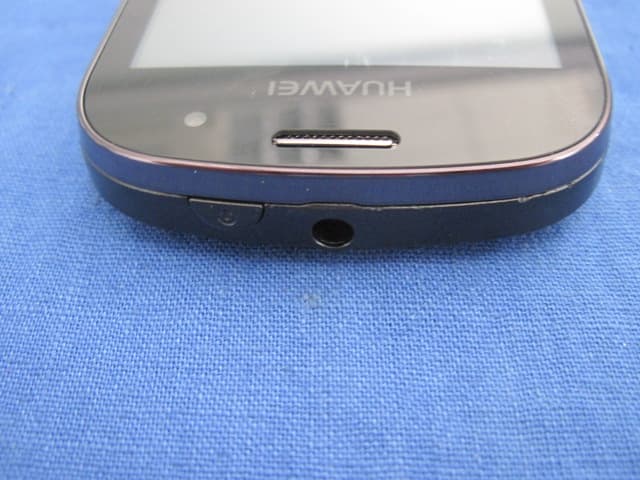
Click to zoom
Application Details
- Equipment Class
- PCE - PCS Licensed Transmitter held to ear
- Date of Grant
- Jul 28, 2011
- Application Purpose
- Original Equipment
- Date of Application
- Jul 28, 2011
- Equipment Note
- HSDPA/ UMTS/ GPRS/ GSM/ EDGE Mobile Phone with Bluetooth
- Frequency Range
- 1850.20000000 - 1909.80000000
- Company
- Huawei Technologies Co.,Ltd
- Country
- China
Documents & Files
Document Text
Text extracted from the exhibit documents filed with the FCC. Open a document above to read the original.
Users Manual
55 Google Services When you turn on your mobile phone for the first time, touch a Google services such as Talk, Gmail, or Market, and you will be prompted to sign in to your Google account. Note: Ensure that your mobile phone has an active data connection (3G/ GPRS) before you sign in to your Google account. If you already have a Google account, touch Sign in and enter your username and password. Creating a Google Account If you do not have a Google account, you can create one: 1. After reading the setup information, touch Next. 2. Touch Create. 3. Enter a first name, last name, and user name for your Google account, and then touch Next. The mobile phone will connect to the Google server to check whether the username is available. If the username you entered is already in use, you will be prompted to choose another one or select one from a list. 4. Enter and confirm your Google account password. 5. Select a security question from the drop down menu, and then enter the answer. 6. Touch Create. 7. When the Google Terms of Service screen appears, touch I agree, Next. 56 8. Enter the characters that appear on the screen, and then touch Next. Tip: To use another Google account, go to the Accounts & sync settings screen, and touch Add account to select which type of accounts you want to add. Using Gmail Gmail is Google’s web-based email service. When you first set up your phone, you may have configured it to use an existing Gmail account or create a new account. The first time you open the Gmail application on your phone, your Inbox will contain the messages from your Gmail account on the web. Opening Gmail Touch > Gmail. The Inbox mail list appears. Any emails you decide to keep on your mobile phone will go to your Inbox folder. Switching Between Accounts 1. In the mail list, press , and then touch Accounts. 2. Touch the account that contains the email you want to read. Creating and Sending an Email 1. In the mail list, press , and then touch Compose. 2. Enter the message recipient’s email address in the To field. If you are sending the email to several recipients, 57 separate the email addresses with commas. You can add as many message recipients as you want. If you want to send a copy (Cc) or a blind copy (Bcc) of the email to other recipients, press , and then touch Add Cc/Bcc. 3. Enter the email subject and write your message. If you want to add a picture attachment, press , and then touch Attach to select the picture you want to attach. 4. After composing your email, touch Send. Replying To or Forwarding an Email 1. In the mail list, touch the email that you want to reply to or forward, and then scroll down to the end of the email. 2. Touch Reply, Reply to all, or Forward. 3. Do one of the following: • If you selected Reply or Reply to all, enter your message. • If you selected Forward, specify the message recipients and add any additional text you want to include with the forwarded message. 4. Touch Send. Searching for an Email 1. In the mail list, press , and then touch Search. 2. Enter the search keywords in the box, and then touch . Customizing Your Gmail Settings 1. In the mail list, press , and then touch Settings. 58 2. Set the following options: • Signature: Touch to enter a signature that is appended at the end of all your emails. • Confirm delete: Select the check box to show a confirmation box when you delete an email. • Batch operations: Select the check box to show the batch operations feature. This feature lets you archive, delete, or apply a label to multiple emails at the same time. • Clear search history: Touch to remove the history of previous message searches. • Labels: Touch to select which Gmail labels to synchronized with your web-based Gmail account. • Email notifications: Select the check box to show a notification icon on the notification bar when you receive an email. • Select ringtone: Touch to choose a ringtone for a new email message. A short sample of the ringtone will play when you select it. If you prefer no ringtone to play when you receive a new email message, touch Silent. Then touch OK to confirm your ringtone selection. • Vibrate: Select the check box if you want your mobile phone to vibrate when you receive a new email message. Using Talk Talk is Google’s instant messaging service. You can use it to communicate in real time with other people using Talk on a phone or on the web. 59 Opening Talk Touch > Talk to open the application. Note: Your Talk account is based on the Google account you set up with your mobile phone. Adding a Friend 1. In the friends list, press , and then touch Add friend. 2. Enter the Talk instant messaging ID or Google email address of the friend you want to add. 3. Touch Send invitation. Accepting an Invitation 1. If you have invited anyone to chat or if someone else has invited you to chat, this information will appear in the friends list. 2. Touch a pending invitation, and then touch Accept or Cancel. Starting a Chat 1. In the friends list, do one of the following: • Touch a friend's name in the friends list. • Use the Navigation key to select a friend's name, and then press . 2. Use the onscreen keyboard to enter text and chat with your friend. 3. After entering your message, touch Send. 60 Setting Notifications for New Instant Messages Whenever you receive an instant message, your mobile phone can play a sound, vibrate, or display an icon. To set up one of these handy notifications, start in the friends list, and then press . Then touch More > Settings. Now choose from one of the following: Signing Out of Talk In the friends list screen, press , and then touch More > Sign out to quit Talk. Using Maps Maps lets you find your current location, view real-time traffic conditions (depending on availability in your locale), and get detailed directions to various destinations on a satellite, traffic, or other kind of map. IM notifications Select the check box to receive a notification on the notification bar when you receive an in…
Text truncated - open the document above for the full version.
Users Manual
HUAWEI U8520-1 User Guide 1 Reading Before Proceeding Safety Precautions Please read the safety precautions carefully to ensure the correct use of your mobile phone. Do not crash, throw, or puncture your mobile phone. Avoid the falling, squeezing, and bending of your mobile phone. Do not use your mobile phone in a moist environment, such as the bathroom. Prevent your mobile phone from being soaked or washed in liquid. Do not switch on your mobile phone when it is prohibited to use phones or when the phone may cause interference or danger. Do not use your mobile phone while driving. Follow any rules or regulations in hospitals and health care facilities. Switch off your mobile phone near medical apparatus. Switch off your mobile phone in aircraft. The phone may cause interference to control equipment of the aircraft. Switch off your mobile phone near high-precision electronic devices. The phone may affect the performance of these devices. 2 Do not attempt to disassemble your mobile phone or its accessories. Only qualified personnel are allowed to service or repair the phone. Do not place your mobile phone or its accessories in containers with a strong electromagnetic field. Do not place magnetic storage media near your mobile phone. Radiation from the phone may erase the information stored on them. Do not put your mobile phone in a high- temperature place or use it in a place with flammable gas such as a gas station. Keep your mobile phone and its accessories away from children. Do not allow children to use your mobile phone without guidance. Use only approved batteries and chargers to avoid the risk of explosions. Observe any laws or regulations on the use of wireless devices. Respect others’ privacy and legal rights when using your wireless device. Strictly follow the relevant instructions of this manual while using the USB cable. Otherwise your mobile phone or PC may be damaged. 3 Legal Notice Copyright © Huawei Technologies Co., Ltd. 2011. All rights reserved. No part of this document may be reproduced or transmitted in any form or by any means without prior written consent of Huawei Technologies Co., Ltd. The product described in this manual may include copyrighted software of Huawei Technologies Co., Ltd. and possible licensors. Customers shall not in any manner reproduce, distribute, modify, decompile, disassemble, decrypt, extract, reverse engineer, lease, assign, or sublicense the said software, unless such restrictions are prohibited by applicable laws or such actions are approved by respective copyright holders under licenses. Trademarks and Permissions , , and are trademarks or registered trademarks of Huawei Technologies Co., Ltd. Other trademarks and product, service and company names mentioned are the property of their respective owners. Notice Some features of the product and its accessories described herein rely on the software installed, capacities and settings of local network, and may not be activated or may be limited by local network operators or network service providers. Thus the descriptions herein may not exactly match the product or its accessories you purchase. 4 Huawei Technologies Co., Ltd. reserves the right to change or modify any information or specifications contained in this manual without prior notice or obligation. Huawei Technologies Co., Ltd. is not responsible for the legitimacy and quality of any products that you upload or download through this mobile phone, including but not limited to the text, pictures, music, movies, and non-built-in software with copyright protection. Any consequences arising from the installation or usage of the preceding products on this mobile phone shall be borne by yourself. NO WARRANTY THE CONTENTS OF THIS MANUAL ARE PROVIDED “AS IS”. EXCEPT AS REQUIRED BY APPLICABLE LAWS, NO WARRANTIES OF ANY KIND, EITHER EXPRESS OR IMPLIED, INCLUDING BUT NOT LIMITED TO, THE IMPLIED WARRANTIES OF MERCHANTABILITY AND FITNESS FOR A PARTICULAR PURPOSE, ARE MADE IN RELATION TO THE ACCURACY, RELIABILITY OR CONTENTS OF THIS MANUAL. TO THE MAXIMUM EXTENT PERMITTED BY APPLICABLE LAW, IN NO CASE SHALL HUAWEI TECHNOLOGIES CO., LTD. BE LIABLE FOR ANY SPECIAL, INCIDENTAL, INDIRECT, OR CONSEQUENTIAL DAMAGES, OR LOST PROFITS, BUSINESS, REVENUE, DATA, GOODWILL OR ANTICIPATED SAVINGS. Import and Export Regulations Customers shall comply with all applicable export or import laws and regulations and will obtain all necessary governmental permits and licenses in order to export, re- 5 export or import the product mentioned in this manual including the software and technical data therein. 6 Getting to Know Your Mobile Phone Mobile Phone View Phone at a Glance Note: All the pictures in this guide are for your reference only. The actual appearance and display depend on the mobile phone you purchase. 1Power key2Earpiece 3Proximity sensors 4Volume control keys 5Call key6End key 7Home key8Send key 1 2 3 4 5 876 15 12 13 14 5 11 10 9 7 Key functions at your fingertips Note: To customize the function of the End key, Touch Settings > General info & option > End button behavior. 9MENU key10Search key 11Back key12Headset jack 13 Charging/Data interface 14Camera 15Speaker Power key • Press to turn on your mobile phone. • Press and hold to open the Phone options menu. • Press to lock the screen when your mobile phone is on. Send keyPress to go to the Call log screen. MENU key • Press to open the menu on an active screen. • Press and hold to open the keyboard so you can perform quick searches. • Press to unlock the screen. Back key • Press to return to the previous screen. • Press and hold to return Homescreen. • Press to exit any application you are running. End key • Press to end a call. • Press to return to the Home screen. 8 To customize sensitivity level of Trackpad, Touch Settings > General info & option > Trackpad. Getting Started with Your Mobile Phone Installing the SIM Card 1. Remove the battery cover. 2. Insert the SIM card as shown in the diagram. Note: Wh…
Text truncated - open the document above for the full version.
Cover Letter(s)
Huawei Technologies Co.,Ltd Date: July 21, 2011 Federal Communications Commission Authorization and Evaluation Division FCC ID: QISU8520-1 ATTESTATION FCC ID: QISU8520-1 Product: Deuce, HUAWEI U8520, U8520, U8520-1, HUAWEI U8520-1, HSDPA/ UMTS/ GPRS/ GSM/ EDGE Mobile Phone with Bluetooth Model: U8520, HUAWEI U8520-1, HUAWEI U8520, U8520-1 We don't provide any controls or software to allow operation outside the USA frequency band when we sell this product in USA. Sincerely, __________________ Zhang Xinghai/manager Huawei Technologies Co.,Ltd
Cover Letter(s)
RF_160, Issue 02 Huawei Technologies Co.,Ltd Declaration of Authorization We Name: Huawei Technologies Co.,Ltd Address: Administration Building, Huawei Base, Bantian, Longgang District, Shenzhen 518129 City: ......... SHENZHEN ................................................................ Country:.........China ............................................................................ Declare that: Name Representative of agent: Gene Chang (1) Agent Company name: QuieTek Corp. Address: Fl.2, No.345, Xin-hu 2 nd Rd., Nei-hu District City: Taipei Country Taiwan is authorized to apply for Certification of the following product(s): Product description: ...... Deuce, HUAWEI U8520, U8520, U8520-1, HUAWEI U8520-1, HSDPA/ UMTS/ GPRS/ GSM/ EDGE Mobile Phone with Bluetooth ...... Type designation: ......U8520,HUAWEIU8520-1,HUAWEIU8520,U8520-1 Trademark: ...... Huawei .................. .................................. on our behalf. Date: ...... 2011/07/21................. City: ...... SHENZHEN .......................... Name: ...... Zhang Xinghai ................................ (2) Function: ......Manager............................... Signature: .......................................... Notes: (1): Required for FCC application (2): For FCC it must be the Grantee Code “owner” or the authorized agent.
Cover Letter(s)
Huawei Technologies Co.,Ltd Date: July 21, 2011 Federal Communications Commission Authorization and Evaluation Division FCC ID: QISU8520-1 Confidentiality Request Pursuant to Sections 0.457 and 0.459 of the Commission’s Rules, the Applicant hereby requests confidential treatment of information accompanying this Application as outlined below: 1 Schematics 2 Block Diagram 3 Operational Description 4 BOM List 5 Tune up procedure The above materials contain trade secrets and proprietary information not customarily released to the public. The public disclosure of these matters might be harmful to the Applicant and provide unjustified benefits to its competitors. The Applicant understands that pursuant to Rule 0.457, disclosure of this Application and all accompanying documentation will not be made before the date of the Grant for this application. Sincerely, ______________________ Zhang Xinghai/manager Huawei Technologies Co.,Ltd
Cover Letter(s)
Statement We declared that : As the WCDMA or the UMTS interface is downward compatible , they can support the GSM function. So the GSM network would be OK when they were used on the two SIM cards. Sincerely, __________________ Zhang Xinghai/manager Huawei Technologies Co.,Ltd
External Photos
Report No:116S073R-RF-US-P06V02 Page: 85 of 97 12. Appendix 2 – EUT Photograph (1) EUT Photo (2) EUT Photo Report No:116S073R-RF-US-P06V02 Page: 86 of 97 (3) EUT Photo (4) EUT Photo Report No:116S073R-RF-US-P06V02 Page: 87 of 97 (5) EUT Photo (6) EUT Photo Report No:116S073R-RF-US-P06V02 Page: 95 of 97 (21) EUT Photo (Adapter #1) (22) EUT Photo (Adapter #1) Report No:116S073R-RF-US-P06V02 Page: 96 of 97 (23) EUT Photo (Adapter #2) (24) EUT Photo (Adapter #2) Report No:116S073R-RF-US-P06V02 Page: 97 of 97 (25) EUT Photo (Adapter #2) (26) EUT Photo
ID Label/Location Info
Label Location
Internal Photos
Report No:116S073R-RF-US-P06V02 Page: 88 of 97 (7) EUT Photo (8) EUT Photo Report No:116S073R-RF-US-P06V02 Page: 89 of 97 (9) EUT Photo (10) EUT Photo Report No:116S073R-RF-US-P06V02 Page: 90 of 97 (11) EUT Photo (12) EUT Photo Report No:116S073R-RF-US-P06V02 Page: 91 of 97 (13) EUT Photo (14) EUT Photo Report No:116S073R-RF-US-P06V02 Page: 92 of 97 (15) EUT Photo (16) EUT Photo Report No:116S073R-RF-US-P06V02 Page: 93 of 97 (17) EUT Photo (18) EUT Photo Report No : 116S073R-HP-US-P03V01 Page: 88 of 127 (3) EUT Photo (4) EUT Photo
RF Exposure Info
Report No : 116S073R-HP-US-P03V01 Page: 1 of 127 SAR Test Report Product Name : Deuce, HUAWEI U8520, U8520, U8520-1, HUAWEI U8520-1, HSDPA/ UMTS/ GPRS/ GSM/ EDGE Mobile Phone with Bluetooth Model No. : U8520, HUAWEI U8520-1, HUAWEI U8520, U8520-1 FCC ID : QISU8520-1 Applicant : Huawei Technologies Co., Ltd. Address : Administration Building, Huawei Base, Bantian, Longgang District, Shenzhen 518129 Date of Receipt : 27/06/2011 Date of Test : 12/07/2011~16/07/2011 Issued Date : 18/07/2011 Report No. : 116S073R-HP-US-P03V01 Report Version : V1.1 The test results relate only to the samples tested. The test report shall not be reproduced except in full without the written approval of QuieTek Corporation. Report No : 116S073R-HP-US-P03V01 Page: 2 of 127 Test Report Certification Issued Date: 18/07/2011 Report No: 116S073R-HP-US-P03V01 Product Name : Deuce, HUAWEI U8520, U8520, U8520-1, HUAWEI U8520-1, HSDPA/ UMTS/ GPRS/ GSM/ EDGE Mobile Phone with Bluetooth Applicant : Huawei Technologies Co., Ltd. Address : Administration Building, Huawei Base, Bantian, Longgang District, Shenzhen 518129 Manufacturer : Huawei Technologies Co., Ltd. Address : Administration Building, Huawei Base, Bantian, Longgang District, Shenzhen 518129 Model No. : U8520, HUAWEI U8520-1, HUAWEI U8520, U8520-1 FCC ID : QISU8520-1 Brand Name : HUAWEI EUT Voltage : DC 3.7V Applicable Standard : FCC Oet65 Supplement C June 2001 IEEE Std. 1528-2003,47CFR § 2.1093 Test Result : Max. SAR Measurement (1g) Head: 1.120 W/kg, Body: 0.700 W/kg, Wi-Fi: 0.042 W/kg Performed Location : Suzhou EMC Laboratory No.99 Hongye Rd., Suzhou Industrial Park Loufeng Hi-Tech Development Zone., Suzhou, China TEL: +86-512-6251-5088 / FAX: +86-512-6251-5098 FCC Registration Number: 800392 Documented By : (Engineering ADM: Alice Ni) Reviewed By : (Senior Engineer: Robin Wu) Approved By : (Engineering Supervisor: Marlin Chen) Report No : 116S073R-HP-US-P03V01 Page: 3 of 127 Laboratory Information We, QuieTek Corporation, are an independent EMC and safety consultancy that was established the whole facility in our laboratories. The test facility has been accredited/accepted(audited or listed) by the following related bodies in compliance with ISO 17025, EN 45001 and specified testing scope: The related certificate for our laboratories about the test site and management system can be downloaded from QuieTek Corporation’s Web Site : http://www.quietek.com/tw/ctg/cts/accreditations.htm The address and introduction of QuieTek Corporation’s laboratories can be founded in our Web site : http://www.quietek.com/ If you have any comments, Please don’t hesitate to contact us. Our contact information is as below: HsinChu Testing Laboratory : No.75-2, 3rd Lin, Wangye Keng, Yonghxing Tsuen, Qionglin Shiang, Hsinchu County 307, Taiwan, R.O.C. TEL:+886-3-592-8858 / FAX:+886-3-592-8859 E-Mail : [email protected] LinKou Testing Laboratory : No. 5-22, Ruei-Shu Valley, Ruei-Ping Tsuen, Lin-Kou Shiang, Taipei, Taiwan, R.O.C. TEL : 886-2-8601-3788 / FAX : 886-2-8601-3789 E-Mail : [email protected] Suzhou (China) Testing Laboratory : No. 99 Hongye Rd., Suzhou Industrial Park Loufeng Hi-Tech Development Zone., Suzhou,China. TEL : +86-512-6251-5088 / FAX : +86-512-6251-5098 E-Mail : [email protected] Taiwan R.O.C. :BSMI, NCC, TAF Germany :TUV Rheinland Norway :Nemko, DNV USA :FCC, NVLAP Japan :VCCI Report No : 116S073R-HP-US-P03V01 Page: 4 of 127 TABLE OF CONTENTS Description Page 1. General Information .................................................................................................6 1.1. EUT Description ..................................................................................................6 1.2. Test Environment.................................................................................................8 2. SAR Measurement System ......................................................................................9 2.1. DASY5 System Description.................................................................................9 2.1.1. Applications ...................................................................................................10 2.1.2. Area Scans ....................................................................................................10 2.1.3. Zoom Scan (Cube Scan Averaging) ..............................................................10 2.1.4. Uncertainty of Inter-/Extrapolation and Averaging .........................................10 2.2. DASY5 E-Field Probe........................................................................................ 11 2.2.1. Isotropic E-Field Probe Specification ............................................................. 11 2.3. Boundary Detection Unit and Probe Mounting Device ......................................12 2.4. DATA Acquisition Electronics (DAE) and Measurement Server ........................12 2.5. Robot.................................................................................................................13 2.6. Light Beam Unit .................................................................................................13 2.7. Device Holder ....................................................................................................14 2.8. SAM Twin Phantom...........................................................................................14 3. Tissue Simulating Liquid .......................................................................................15 3.1. The composition of the tissue simulating liquid .................................................15 3.2. Tissue Calibration Result...................................................................................16 3.3. Tissue Dielectric Parameters for Head and Body Phantoms .............................18 4. SAR Measurement Procedure ...............................................................................19 4.1. SAR System Validation.........................................…
Text truncated - open the document above for the full version.
Test Report
FCC Part22H&24E Test Report Product Name : Deuce, HUAWEI U8520, U8520, U8520-1, HUAWEI U8520-1, HSDPA/ UMTS/ GPRS/ GSM/ EDGE Mobile Phone with Bluetooth Model No. : U8520, HUAWEI U8520-1, HUAWEI U8520, U8520-1 FCC ID : QISU8520-1 Applicant : Huawei Technologies Co., Ltd. Address : Administration Building, Huawei Base, Bantian, Longgang District, Shenzhen 518129 Date of Receipt : 27/06/2011 Test Date : 27/06/2011~19/07/2011 Issued Date : 19/07/2011 Report No. : 116S073R-HP-US-P07V01 Report Version : V 1.1 The test results relate only to the samples tested. The test results shown in the test report are traceable to the national/international standard through the calibration of the equipment and evaluated measurement uncertainty herein. This report must not be used to claim product endorsement by TAF, NVLAP, NIST or any agency of the Government. The test report shall not be reproduced except in full without the written approval of QuieTek Corporation. Report No: 117S073R-HP-US-P07V01 Page: 2 of 69 Test Report Certification Issued Date : 19/07/2011 Report No. : 117S073R-HP-US-P07V01 Product Name : Deuce, HUAWEI U8520, U8520, U8520-1, HUAWEI U8520-1, HSDPA/ UMTS/ GPRS/ GSM/ EDGE Mobile Phone with Bluetooth Applicant : Huawei Technologies Co., Ltd. Address : Administration Building, Huawei Base, Bantian, Longgang District, Shenzhen 518129 Manufacturer : Huawei Technologies Co., Ltd. Address : Administration Building, Huawei Base, Bantian, Longgang District, Shenzhen 518129 Model No. : U8520, HUAWEI U8520-1, HUAWEI U8520, U8520-1 FCC ID : QISU8520-1 EUT Voltage : DC 3.7V Brand Name : HUAWEI Applicable Standard : FCC CFR Title 47 Part 2,TIA/EIA 603-C FCC Part22 Subpart H, FCC Part24 Subpart E Test Result : Complied Performed Location : Suzhou EMC Laboratory No.99 Hongye Rd., Suzhou Industrial Park Loufeng Hi-Tech Development Zone., Suzhou, China TEL: +86-512-6251-5088 / FAX: +86-512-6251-5098 FCC Registration Number: 800392 Documented By : (Engineering ADM: Alice Ni) Reviewed By : (Senior Engineer: Robin Wu) Approved By : (Engineering Supervisor: Marlin Chen) Report No: 117S073R-HP-US-P07V01 Page: 3 of 69 Laboratory Information We, QuieTek Corporation, are an independent EMC and safety consultancy that was established the whole facility in our laboratories. The test facility has been accredited/accepted(audited or listed) by the following related bodies in compliance with ISO 17025, EN 45001 and specified testing scope: The related certificate for our laboratories about the test site and management system can be downloaded from QuieTek Corporation’s Web Site : http://www.quietek.com/tw/ctg/cts/accreditations.htm The address and introduction of QuieTek Corporation’s laboratories can be founded in our Web site : http://www.quietek.com/ If you have any comments, Please don’t hesitate to contact us. Our contact information is as below: HsinChu Testing Laboratory : No.75-2, 3 rd Lin, Wangye Keng, Yonghxing Tsuen, Qionglin Shiang, Hsinchu County 307, Taiwan, R.O.C. TEL:+886-3-592-8858 / FAX:+886-3-592-8859 E-Mail : [email protected] LinKou Testing Laboratory : No. 5-22, Ruei-Shu Valley, Ruei-Ping Tsuen, Lin-Kou Shiang, Taipei, Taiwan, R.O.C. TEL : 886-2-8601-3788 / FAX : 886-2-8601-3789 E-Mail : [email protected] Suzhou (China) Testing Laboratory : No. 99 Hongye Rd., Suzhou Industrial Park Loufeng Hi-Tech Development Zone., Suzhou,China. TEL : +86-512-6251-5088 / FAX : +86-512-6251-5098 E-Mail : [email protected] Taiwan R.O.C. :BSMI, NCC, TAF Germany :TUV Rheinland Norway :Nemko, DNV USA :FCC, NVLAP Japan :VCCI Report No: 117S073R-HP-US-P07V01 Page: 4 of 69 TABLE OF CONTENTS Description Page 1. General Information .................................................................................................... 6 1.1. EUT Description ......................................................................................................... 6 1.2. Mode of Operation...................................................................................................... 8 1.3. Tested System Details ................................................................................................ 9 1.4. Configuration of Tested System ................................................................................ 10 1.5. EUT Exercise Software............................................................................................. 11 2. Technical Test ........................................................................................................... 12 2.1. Summary of Test Result............................................................................................ 12 2.2. Test Environment...................................................................................................... 13 3. Peak Output Power .................................................................................................. 14 3.1. Test Equipment......................................................................................................... 14 3.2. Test Setup................................................................................................................. 15 3.3. Limit ..........................................................................................................................15 3.4. Test Procedure......................................................................................................... 15 3.5. Uncertainty ............................................................................................................... 17 3.6. Test Result................................................................................................................ 18 3.7. Test Photograph....................................................................................................... 23 4. Occupied Bandwidth................................................................................................. 25 4.1. Test Equipment........................................…
Text truncated - open the document above for the full version.
Test Setup Photos
Part 15B Test Photograph Test Mode: Mode 1,3 Description: Front View of Conducted Emission Test Setup Description: Side View of Conducted Emission Test Setup Test Mode: Mode 2 Description: Front View of Conducted Emission Test Setup Description: Side View of Conducted Emission Test Setup The SAR Test Setup Photographs Left-Cheek Touch Left-Tilt 15° Right-Cheek Touch Right-Tilt 15° Body SAR Back 15mm Body SAR Front 15mm Body SAR Back 15mm with Headset Depth of the liquid in the phantom – Zoom in Note: The position used in the measurements were according to IEEE 1528 - 2003 Part 15 C – Test Setup Photograph Description: Conducted Emission Test Setup Description: Radiated Emission Test Setup for Below 1GHz Description: Radiated Emission Test Setup for 1~18GHz Description: Radiated Emission Test Setup for Above 18GHz Part 22H&24E Test Photograph Description: ERP Test Setup Description: Substitution Antenna for ERP Test Description: EIRP Test Setup Description: Substitution Antenna for EIRP Test
Contact Information
Applicant
Zhang Xinghai
Technical Contact
QuieTek Technology (Suzhou) Co.,Ltd.Marlin Chen
[email protected]86-0512-6251-5088
No.99 Hongye RD.Suzhou Industrial Park, · Suzhou · China
Non-Technical Contact
QuieTek Technology (Suzhou) Co.,Ltd.Stella Lu
[email protected]86-0512-6251-5088
Test Firm
DEKRA Testing and Certification (Suzhou) Co., Ltd.Jerry Pan
Technical Specifications
| # | Rule Parts | Frequency Range | Power Output | Emission | Tolerance |
|---|---|---|---|---|---|
| 4 | 24E | 1.85 GHz - 1.91 GHz | 289.70 mW | 300KG7W | 2.5 ppm |
Other Applications from Huawei Technologies Co.,Ltd

QISSUN2000
Jun 27, 2021Solar Inverter
Equipment Class
DTS - Digital Transmission System
QISCP81-1
Oct 22, 2020Watch Wireless Charger
Equipment Class
DCD - Part 15 Low Power Transmitter Below 1705 kHz
QISRRU3278
Sep 02, 2020Remote Radio Unit
Equipment Class
CBD - Citizens Band Category A and B Devices
QISR2561
Jul 11, 2020Indoor Router
Equipment Class
DTS - Digital Transmission System
QISSMARTLOGGER310
Mar 23, 2020Solar Smart Monitor & Data Logger
Equipment Class
DTS - Digital Transmission System