QISU8812D-5GSM Mobile Phone
Huawei Technologies Co.,Ltd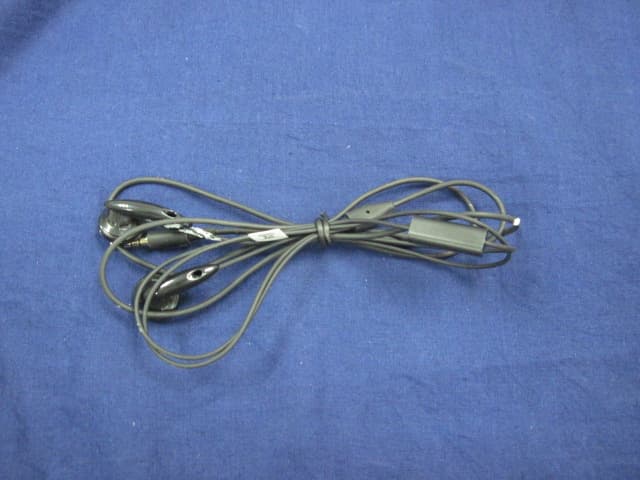
Click to zoom
Application Details
- Equipment Class
- JBP - Part 15 Class B Computing Device Peripheral
- Date of Grant
- Jul 28, 2012
- Application Purpose
- Original Equipment
- Date of Application
- Jul 25, 2012
- Equipment Note
- GSM Mobile Phone
- Company
- Huawei Technologies Co.,Ltd
- Country
- China
Documents & Files
Document Text
Text extracted from the exhibit documents filed with the FCC. Open a document above to read the original.
Users Manual
Welcome to HUAWEI Quick Start Guide HUAWEI Ascend G 302D Personal Information and Data Security The use of some functions or third-party applications on your device could result in your personal information and data being lost or becoming accessible to others. Several measures are recommended to help you protect personal and confidential information. • Place your device in a safe area to prevent it from unauthorized use. • Set your device screen to lock and create a password or unlock pattern to open it. • Periodically back up personal information kept on your SIM/ USIM card, memory card, or stored in your device memory. If you change to a different device, be sure to move or delete any personal information on your old device. • If you are worried about viruses when you receive messages or emails from a stranger, you can delete them without opening them. • If you use your device to browse the Internet, avoid websites that might pose a security risk to avoid theft of your personal information. • If you use services such as WLAN tether or Bluetooth, set passwords for these services to prevent unauthorized access. When these services are not in use, turn them off. • Install or upgrade device security software and regularly scan for viruses. • Be sure to obtain third-party applications from a legitimate source. Downloaded third-party applications should be scanned for viruses. • Install security software or patches released by Huawei or third- party application providers. • Some applications require and transmit location information. As a result, a third-party may be able to share your location information. • Your device may provide detection and diagnostic information to third-party application providers. Third party vendors use this information to improve their products and services. • If you have concerns about the security of your personal information and data, please contact [email protected]. What is in Your Box Phone at a Glance All the pictures in this guide are for your reference only. Your phone’s actual display features may be different to those described here, depending on its software version. • Mobile phone • USB cable •Battery • Headset • Charger • Quick Start Guide Earpiece Headset jack Power key Front Camera Speaker Flashlight Sensor Camera Volume keys Charger jack/ USB port Microphone Back key Home key Menu key Installing the SIM/USIM Card There are two steps to install the SIM/USIM card: 1. Remove the battery cover. 2. Insert the SIM/USIM card. (Optional) Installing the microSD Card If you want to expand your phone memory, you can also insert a microSD card. 1. Remove the battery cover. 2. Insert the microSD card into the card slot as shown in the diagram. 12 1 1 WCDMA 2 GSM 1 WCDMA 2 GSM USIM SIM 1 2 1 WCDMA 2 GSM Installing the Battery 1. Angle the edge labeled a (with the contacts) into the bottom end of the battery compartment. 2. Push the edge labeled b into the compartment until the battery clicks firmly into place. Charging the Battery Before charging the battery, ensure that it has been properly installed on your phone. 1. Connect the USB cable that came with your mobile phone to the charger. 2. Connect the other end of the USB cable to your mobile phone. Then, to start charging, plug the charger into an electrical outlet. If you charge your mobile phone while it is powered on, the battery icon on the notification bar indicates the charging status. When the battery icon changes to , your mobile phone is fully charged. 1 WCDMA 2 GSM a b Status Indicator The color of the status indicator tells you the status of your mobile phone’s battery. Touchscreen Actions Using your finger on the touchscreen, you can operate your phone conveniently. Powering On Your Mobile Phone Press . The first time you power on your phone, you will be asked to sign in to your account and set up your mobile phone. If personal identification number (PIN) protection is enabled on your mobile phone, you must enter your PIN before using the mobile phone. Status Indicator Green: Electricity at 90% to a fully charged(when connected to charger). Red: Electricity below 90%(when connected to charger). Drag TouchTouch & holdDouble touch RotateFlick Powering Off Your Mobile Phone 1. Press and hold to open the Phone options menu. 2. Touch Power off. Locking the Screen • When your phone is on, press to lock the screen. When the screen is locked, you can still receive messages and calls. • If your phone is idle for a while, the screen will lock automatically. Unlocking the Screen 1. Press to wake up the screen. 2. Drag the lock icon from left to right to unlock the screen. Home Screen You can set up the Home screen according to your own preferences, for example by adding a shortcut or a widget to your Home screen, or changing the wallpaper. To return to the Home screen from any of its extensions, press . When a new notification icon appears on the notification bar, place your finger on the notification bar and flick down to open the notification panel. Adding a New Home Screen Item 1. Touch and hold a blank area on the Home screen until the Add to home screen menu is displayed. 2. Select an item to add it to the Home screen. Moving a Home Screen Item 1. Touch and hold an item on the Home screen until the item expands in size and the mobile phone vibrates. 2. Without lifting your finger, drag the item to the desired position on the screen, and then release it. 10:23'3 21 21 10:23'3 Flick your finger left or right across the Home screen. Touch to view thumbnails of the Home screen and its extensions. Touch a thumbnail to open the screen. 10:23'3 21 10:23'3 21 Removing a Home Screen Item 1. Touch and hold an item on the Home screen until the item expands and the mobile phone vibrates. 2. Without lifting your finger, drag the item to the trash can. When the item and the trash can turn red, the item is ready to be removed. 3. Release the item to remove it from the Home screen. Importing Contacts from a SIM Card 1…
Text truncated - open the document above for the full version.
Cover Letter(s)
HUAWEI TECHNOLOGIES CO., LTD. Date: 2012-07-04 Federal Communications Commission Authorization and Evaluation Division FCC ID: QISU8812D-5 Confidentiality Request Pursuant to Sections 0.457 and 0.459 of the Commission’s Rules, the Applicant hereby requests confidential treatment of information accompanying this Application as outlined below: 1 Schematics 2 Block Diagram 3 Operational Description 4 BOM List 5 Tune up procedure The above materials contain trade secrets and proprietary information not customarily released to the public. The public disclosure of these matters might be harmful to the Applicant and provide unjustified benefits to its competitors. The Applicant understands that pursuant to Rule 0.457, disclosure of this Application and all accompanying documentation will not be made before the date of the Grant for this application. Sincerely, _________________________ Zhang Xinghai/manager HUAWEI TECHNOLOGIES CO., LTD.
Cover Letter(s)
HUAWEI TECHNOLOGIES CO., LTD. Date: 2012-07-18 Federal Communications Commission Authorization and Evaluation Division FCC ID: QISU8812D-5 ATTESTATION FCC ID: QISU8812D-5 Product: HUAWEI Ascend G 302D;Ascend G 302D; TINO; Tino; HSDPA/UMTS/GPRS/GSM/EDGE Mobile Phone with Bluetooth Model: HUAWEI U8812D-5, U8812D-5, HUAWEI U8812D , U8812D We don't provide any controls or software to allow operation outside the USA frequency band when we sell this product in USA. Sincerely, __________________ Zhang Xinghai/manager HUAWEI TECHNOLOGIES CO., LTD.
External Photos
1. EUT Photograph (1) EUT Photo (2) EUT Photo Report No.: 125S046R-RF-US-P06V02 Page: 2 of 6 (3) EUT Photo (4) EUT Photo Report No.: 125S046R-RF-US-P06V02 Page: 3 of 6 (5) EUT Photo (6) EUT Photo Report No.: 125S046R-RF-US-P06V02 Page: 4 of 6 (7) EUT Photo (Adapter #1) (8) EUT Photo (Adapter #1) Report No.: 125S046R-RF-US-P06V02 Page: 5 of 6 (9) EUT Photo (Adapter #2) (10) EUT Photo (Adapter #2) Report No.: 125S046R-RF-US-P06V02 Page: 6 of 6 (11) EUT Photo (12) EUT Photo
ID Label/Location Info
Label location
Internal Photos
(1) EUT Photo (2) EUT Photo (3) (4) EUT Photo (5) EUT Photo (6) EUT Photo (7) EUT Photo (8) EUT Photo (9) EUT Photo (10) EUT Photo (Battery #1) (11) EUT Photo (Battery #1) (12) EUT Photo (Battery #2) (13) EUT Photo (Battery #2) (14) EUT Photo (Battery #3) (15) EUT Photo (Battery #3)
Test Report
FCC Part15B Test Report Product Name : HUAWEI Ascend G 302D; Ascend G 302D; TINO; Tino; HSDPA/UMTS/GPRS/GSM/EDGE Mobile Phone with Bluetooth Model No. : HUAWEI U8812D-5, U8812D-5, HUAWEI U8812D, U8812D Applicant : Huawei Technologies Co., Ltd. Address : Bantian, Longgang District, Shenzhen, 518129 Guangdong, P. R. China Date of Receipt : 17/05/2012 Test Date : 17/05/2012~26/06/2012 Issued Date : 28/06/2012 Report No. : 125S046R-HP-US-P01V01 Report Version : V 1.0 The test results relate only to the samples tested. The test results shown in the test report are traceable to the national/international standard through the calibration of the equipment and evaluated measurement uncertainty herein. This report must not be used to claim product endorsement by TAF, CNAS or any agency of the Government. The test report shall not be reproduced except in full without the written approval of QuieTek Corporation. Report No.: 125S046R-HP-US-P01V01 Page: 2 of 39 Test Report Certification Issued Date: 28/06/2012 Report No. : 125S046R-HP-US-P01V01 Product Name : HUAWEI Ascend G 302D; Ascend G 302D; TINO; Tino; HSDPA/UMTS/GPRS/GSM/EDGE Mobile Phone with Bluetooth Applicant : Huawei Technologies Co., Ltd. Address : Bantian, Longgang District, Shenzhen, 518129 Guangdong, P. R. China Manufacturer : Huawei Technologies Co., Ltd. Address : Bantian, Longgang District, Shenzhen, 518129 Guangdong, P. R. China Model No. : HUAWEI U8812D-5, U8812D-5, HUAWEI U8812D, U8812D EUT Voltage : DC 3.7V Brand Name : HUAWEI Applicable Standard : FCC Part 15 Subpart B: 2012 ANSI C63.4: 2009 Test Result : Complied Performed Location : Suzhou EMC Laboratory No.99 Hongye Rd., Suzhou Industrial Park Loufeng Hi-Tech Development Zone., Suzhou, China TEL: +86-512-6251-5088 / FAX: +86-512-6251-5098 Documented By : (Engineering ADM: Alice Ni) Reviewed By : (Engineering Supervisor: Robin Wu) Approved By : (Manager: Marlin Chen) Report No.: 125S046R-HP-US-P01V01 Page: 3 of 39 Laboratory Information We, QuieTek Corporation, are an independent EMC and safety consultancy that was established the whole facility in our laboratories. The test facility has been accredited/accepted(audited or listed) by the following related bodies in compliance with ISO 17025, EN 45001 and specified testing scope: The related certificate for our laboratories about the test site and management system can be downloaded from QuieTek Corporation’s Web Site :http://www.quietek.com/tw/ctg/cts/accreditations.htm The address and introduction of QuieTek Corporation’s laboratories can be founded in our Web site : http://www.quietek.com/ If you have any comments, Please don’t hesitate to contact us. Our contact information is as below: HsinChu Testing Laboratory : No.75-2, 3rd Lin, Wangye Keng, Yonghxing Tsuen, Qionglin Shiang, Hsinchu County 307, Taiwan, R.O.C. TEL:+886-3-592-8858 / FAX:+886-3-592-8859 E-Mail : [email protected] LinKou Testing Laboratory : No.5-22, Ruishukeng, Linkou Dist., New Taipei City 24451, Taiwan, R.O.C. TEL : 886-2-8601-3788 / FAX : 886-2-8601-3789 E-Mail : [email protected] Suzhou Testing Laboratory : No.99 Hongye Rd., Suzhou Industrial Park Loufeng Hi-Tech Development Zone., SuZhou, China TEL : +86-512-6251-5088 / FAX : 86-512-6251-5098 E-Mail : [email protected] Taiwan R.O.C. :BSMI, NCC, TAF Germany :TUV Rheinland Norway :Nemko, DNV USA :FCC, NVLAP Japan :VCCI China :CNAS Report No.: 125S046R-HP-US-P01V01 Page: 4 of 39 TABLE OF CONTENTS Description Page 1. General Information........................................................................................................5 1.1. EUT Description ..............................................................................................5 1.2. Mode of Operation...........................................................................................8 1.3. Tested System Details .....................................................................................9 1.4. Configuration of Tested System.....................................................................10 1.5. EUT Exercise Software..................................................................................12 2. Technical Test ...............................................................................................................13 2.1. Summary of Test Result.................................................................................13 2.2. List of Test Equipment ...................................................................................14 2.3. Measurement Uncertainty..............................................................................15 2.4. Test Environment...........................................................................................16 3. Conducted Emission ....................................................................................................17 3.1. Test Specification...........................................................................................17 3.2. Test Setup .....................................................................................................17 3.3. Limit...............................................................................................................17 3.4. Test Procedure ..............................................................................................17 3.5. Deviation from Test Standard.........................................................................18 3.6. Test Result.....................................................................................................19 3.7. Test Photograph ............................................................................................23 4. Radiated Emission .......................................................................................................25 4.1. Test Specification...........................................................................................25 4.2. Test Setup .....................................................…
Text truncated - open the document above for the full version.
Test Setup Photos
Part 15B-Test Photograph Test Mode: Mode 1~2,4 Description: Radiated Emission Below 1G Test Setup Test Mode: Mode 3 Test Mode: Mode 4 Description: Radiated Emission Above 1G Test Setup SAR-Test Setup Photographs Test Setup Photographs Left-Cheek Touch Left-Tilt 15° Right-Cheek Touch Right-Tilt 15° Body SAR Back 10mm Body SAR Front 10mm Body SAR Back 10mm with Headset Body SAR Front 10mm with Headset Body SAR Bottom 10mm for GSM Body SAR Right Side 10mm for GSM Body SAR Left Side 10mm for GSM Body SAR Left Side 10mm for WLAN Body SAR Top 10mm for WLAN Depth of the liquid in the phantom – Zoom in Note: The position used in the measurements were according to IEEE 1528 - 2003 Part15 C-Test Setup Photograph Description: Conducted Emission Test Setup Description: Radiated Emission Test Setup for Below 1GHz Description: Radiated Emission Test Setup for 1~18GHz Description: Radiated Emission Test Setup for Above 18GHz Part 22&24-Test Photograph Description: ERP Test Setup Description: Substitution Antenna for ERP Test Description: EIRP Test Setup Description: Substitution Antenna for EIRP Test
Contact Information
Applicant
Zhang Xinghai
Technical Contact
QuieTek Technology (Suzhou) Co.,Ltd.Malin Chen
[email protected]86-0512-6251-5088
No.99 Hongye RD.Suzhou Industrial Park, · Suzhou · China
Non-Technical Contact
QuieTek Technology (Suzhou) Co.,Ltd.Stella Lu
[email protected]86-0512-6251-5088
Test Firm
DEKRA Testing and Certification (Suzhou) Co., Ltd.Jerry Pan
Technical Specifications
| # | Rule Parts | Frequency Range | Power Output |
|---|---|---|---|
| 1 | 15B | - | - |
Other Applications from Huawei Technologies Co.,Ltd

QISSUN2000
Jun 27, 2021Solar Inverter
Equipment Class
DTS - Digital Transmission System
QISCP81-1
Oct 22, 2020Watch Wireless Charger
Equipment Class
DCD - Part 15 Low Power Transmitter Below 1705 kHz
QISRRU3278
Sep 02, 2020Remote Radio Unit
Equipment Class
CBD - Citizens Band Category A and B Devices
QISR2561
Jul 11, 2020Indoor Router
Equipment Class
DTS - Digital Transmission System
QISSMARTLOGGER310
Mar 23, 2020Solar Smart Monitor & Data Logger
Equipment Class
DTS - Digital Transmission System