QISU9200Ascend P1; HSPA+/HSUPA/HSDPA/UMTS/GSM/GPRS/EDGE Mobile Phone with BT
Huawei Technologies Co.,Ltd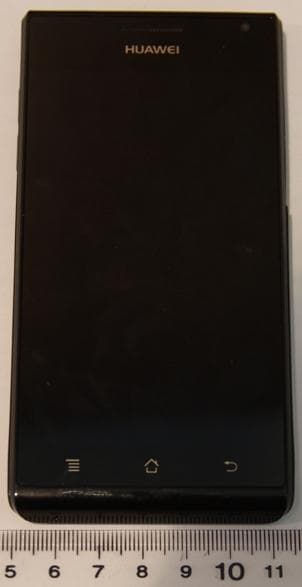
Click to zoom
Application Details
- Equipment Class
- JBP - Part 15 Class B Computing Device Peripheral
- Date of Grant
- May 23, 2012
- Application Purpose
- Original Equipment
- Date of Application
- May 23, 2012
- Equipment Note
- Ascend P1; HSPA+/HSUPA/HSDPA/UMTS/GSM/GPRS/EDGE Mobile Phone with BT
- Company
- Huawei Technologies Co.,Ltd
- Country
- China
Documents & Files
Document Text
Text extracted from the exhibit documents filed with the FCC. Open a document above to read the original.
Users Manual
Safety Information Legal Notice Copyright © Huawei Technologies Co., Ltd. 2012. All rights reserved. No part of this document may be reproduced or transmitted in any form or by any means without prior written consent of Huawei Technologies Co., Ltd. The product described in this manual may include copyrighted software of Huawei Technologies Co., Ltd. and possible licensors. Customers shall not in any manner reproduce, distribute, modify, decompile, disassemble, decrypt, extract, reverse engineer, lease, assign, or sublicense the said software, unless such restrictions are prohibited by applicable laws or such actions are approved by respective copyright holders. Trademarks and Permissions , ,and are trademarks or registered trademarks of Huawei Technologies Co., Ltd. Android is a trademark of Google Inc. Other trademarks, product, service and company names mentioned are the property of their respective owners. Manufactured under license from Dolby Laboratories. Dolby and the double-D symbol are registered trademarks of Dolby Laboratories. Notice Some features of the product and its accessories described herein rely on the software installed, capacities and settings of local network, and therefore may not be activated or may be limited by local network operators or network service providers. Thus the descriptions herein may not match exactly the product or its accessories you purchase. Huawei Technologies Co., Ltd. reserves the right to change or modify any information or specifications contained in this manual without prior notice and without any liability. Third-Party Software Statement Huawei Technologies Co., Ltd. does not own the intellectual property of the third-party software and applications that are delivered with this product. Therefore, Huawei Technologies Co., Ltd. will not provide any warranty of any kind for these third-party software and applications. Neither will Huawei Technologies Co., Ltd. provide support to customers who use these third-party software and applications, nor be responsible or liable for the functions of these third-party software and applications. Third-party software and applications services may be interrupted or terminated at any time. Huawei Technologies Co., Ltd. does not guarantee that any content or service would be maintained for any period during its availability. Third- party service providers provide content and services through network or transmission tools outside of the control of Huawei Technologies Co., Ltd. To the greatest extent permitted by applicable law, it is explicitly stated that Huawei Technologies Co., Ltd. shall not compensate or be liable for services provided by third-party service providers, or the interruption or termination of third-party contents or services. Huawei Technologies Co., Ltd. shall not be responsible for the legality , quality, or any other aspects of any software installed on this product, or for any uploaded or downloaded third-party works, such as texts, images, videos, or software. Customers shall bear the risk for any and all effects, including incompatibility between the software and this product, which result from installing software or uploading or downloading the third-party works. This product uses the open-source Android™ platform. Huawei Technologies Co., Ltd. has made necessary changes to the platform. Therefore, this product may not support all the functions that are supported by the standard Android platform or may be incompatible with third-party software. Huawei Technologies Co., Ltd. shall not be liable for any of such situation. DISCLAIMER OF WARRANTIES THE CONTENTS OF THIS MANUAL ARE PROVIDED “AS IS”. EXCEPT AS REQUIRED BY APPLICABLE LAWS, NO WARRANTIES OF ANY KIND, EITHER EXPRESS OR IMPLIED, INCLUDING BUT NOT LIMITED TO, THE IMPLIED WARRANTIES OF MERCHANTABILITY AND FITNESS FOR A P ARTICULAR PURPOSE, ARE MADE IN RELATION TO THE ACCURACY, RELIABILITY OR CONTENTS OF THIS MANUAL. LIMITATIONS OF LIABILITY TO THE MAXIMUM EXTENT PERMITTED BY APPLICABLE LAW, IN NO EVENT SHALL HUAWEI TECHNOLOGIES CO., LTD. BE LIABLE FOR ANY SPECIAL, INCIDENTAL, INDIRECT, OR CONSEQUENTIAL DAMAGES, OR LOST PROFITS, BUSINESS, REVENUE, DATA, GOODWILL OR ANTICIPATED SAVINGS. THE MAXIMUM LIABILITY (THIS LIMITATION SHALL NOT APPLY TO LIABILITY FOR PERSONAL INJURY TO THE EXTENT APPLICABLE LAW PROHIBITS SUCH A LIMITATION) OF HUAWEI TECHNOLOGIES CO., LTD. ARISING FROM THE USE OF THE PRODUCT DESCRIBED IN THIS DOCUMENT SHALL BE LIMITED TO THE AMOUNT PAID BY CUSTOMERS FOR THE PURCHASE OF THIS PRODUCT. Import and Export Regulations Customers shall comply with all applicable export or import laws and regulations and be responsible to obtain all necessary governmental permits and licenses in order to export, re-export or import the product mentioned in this manual including the software and technical data therein. Warnings and Precautions This section contains important information pertaining to the operating instructions of your device. It also contains information about how to use the device safely. Read this information carefully before using your device. Electronic Device Power off your device if using the device is prohibited. Do not use the device when using the device causes danger or interference with electronic devices. Medical Device • Follow rules and regulations set forth by hospitals and he al th car e fac ili tie s. Do no t us e you r de vic e when us in g the device is prohibited. • Pacemaker manufacturers recommend that a minimum distance of 15 cm be maintained between a device and a pacemaker to prevent potential interference with the pacemaker. If you are using a pacemaker, use the device on the opposite side of the pacemaker and do not carry the device in your front pocket. Potentially Explosive Atmosphere Power off your device in any area with a potentially explosive atmosphere, and comply with all signs and instructions. Areas that may have potentially explosive atmospheres include the areas where you would…
Text truncated - open the document above for the full version.
Users Manual
Quick Start Guide Welcome to HUAWEI Copyright © Huawei Technologies Co., Ltd. 2012. All rights reserved. Trademarks and Permissions , and are trademarks or registered trademarks of Huawei Technologies Co., Ltd. Manufactured under license from Dolby Laboratories. Dolby and the double-D symbol are trademarks of Dolby Laboratories. Android is a trademark of Google Inc. DISCLAIMER OF WARRANTIES THE CONTENTS OF THIS MANUAL ARE PROVIDED “AS IS”. EXCEPT AS REQUIRED BY APPLICABLE LAWS, NO WARRANTIES OF ANY KIND, EITHER EXPRESS OR IMPLIED, INCLUDING BUT NOT LIMITED TO, THE IMPLIED WARRANTIES OF MERCHANTABILITY AND FITNESS FOR A PARTICULAR PURPOSE, ARE MADE IN RELATION TO THE ACCURACY, RELIABILITY OR CONTENTS OF THIS MANUAL. LIMITATIONS OF LIABILITY TO THE MAXIMUM EXTENT PERMITTED BY APPLICABLE LAW, IN NO EVENT SHALL HUAWEI TECHNOLOGIES CO., LTD. BE LIABLE FOR ANY SPECIAL, INCIDENTAL, INDIRECT, OR CONSEQUENTIAL DAMAGES, OR LOST PROFITS, BUSINESS, REVENUE, DATA, GOODWILL OR ANTICIPATED SAVINGS. English 1 Getting to Know Your Phone 1 Figures in this guide are provided for your reference only. Depending on the software version, your phone's user interface may be different from the user interface shown in the figures. 4 5 2 1 6 7 8 3 9 10 11 12 13 14 1Earpiece2Headset jack 3Charger jack/USB port4USIM card slot 5Secondary camera6Status indicator 7 Power key 8microSD card slot 9Microphone 10Camera 11 Noise reduction microphone 12 Flash unit 13 Volume keys14Speaker • Press and hold to power on your phone. • Press and hold to display the options menu from where you can power off your phone and perform some shortcut operations. • Press to lock the screen when your phone is active. • Press and hold for 10 or more seconds to forcibly power off your phone. • Touch to return to the previous screen. • Touch to exit the current application. • Touch to return to the Home screen. • Touch to display the current screen's options menu (some screens have no menu). 2 Installing SIM and microSD Cards Install the USIM card or microSD card as shown in the following diagram. Power off your phone before installation. Install a USIM card Standard USIM card dimensionsᷛ 25mmx15mmx0.76mm(DxWxH) 1 *The micro SD card is an optional accessory Install a *microSD card 2 • Your phone supports only standard USIM cards. Using a non-standard USIM card may cause damage to your phone. • Do not install or remove a USIM card when your phone is powered on. 3 Charging Your Phone When charging your phone while it is powered on, the battery is fully charged when the battery icon changes to . Use the charger provided with your phone. If the phone has not been used for a long time or if the battery charge is fully depleted, the phone may not power on immediately after the charger is plugged in. Please charge the battery for a while before attempting to power on the phone. USIM micro SD Battery status indicator Status indicator Green continuous light: Battery power level is high, or, if the power adapter is connected, fully charged. Orange: The power adapter is connected and the phone is charging. Red: The battery power level is low. 4 Powering Your Phone On or Off Powering Your Phone On Press and hold the key to power on your phone. If this is the first time you have powered on the phone, configure its initial settings. If your SIM card is PIN-protected, enter the personal identification number (PIN) to use the phone. Powering Your Phone Off Press and hold the key to display the options menu, and touch Power off to power your phone off. If your phone malfunctions or cannot be properly powered off, press and hold the Power key for at least 10 seconds to forcibly power off your phone. Using the Touchscreen Touch: Touch the screen to select an option or start an application. Touch and hold: Touch and hold the screen or text being edited to display the available options menu. Slide: Quickly drag your finger across the screen vertically or horizontally. Drag: Touch and hold an item, and then drag it to the desired location on the screen. For example, on the Home screen, you can move an icon by dragging it to another l ocation or remove an icon by dragging it to the trash can. 5 Certification Information (SAR) This device meets guidelines for exposure to radio waves. Your device is a low-power radio transmitter and receiver. As recommended by international guidelines, the device is designed not to exceed the limits for exposure to radio waves. These guidelines were developed by the independent scientific organization International Commission on Non- Ionizing Radiation Protection (ICNIRP) and include safety m easures designed to ensure safety for all users, regardless of age and health. The Specific Absorption Rate (SAR) is the unit of measurement for the amount of radio frequency energy absorbed by the body when using a device. The SAR value is determined at the highest certified power level in laboratory conditions, but the actual SAR level of the device when being operated can be well below the value. T his is because the device is designed to use the minimum power required to reach the network. The SAR limit adopted by USA and Canada is 1.6 watts/ kilogram (W/kg) averaged over one gram of tissue. The Highest SAR value reported to the FCC and IC for this device type when tested for use at the ear is 1.070 W/kg, when properly worn on body is 1.160 W/kg, and when using Wi-Fi h otspot function is 1.150 W/Kg. The SAR limit also adopted by Europe is 2.0 W/kg averaged over 10 grams of tissue. The highest SAR value for this device type when tested at the ear is 0.606 W/kg, and when properly worn on the body is 0.435 W/kg. 6 Finding the User Guide For more information about how to use your phone, please read the user guide. You can find the user guide by visiting the Web site: http://www.huaweidevice.com/ worldwide. Industry Canada Compliance This device complies with Industry Canada. This device with the Class B limits for radio noise emissions as set out i…
Text truncated - open the document above for the full version.
Attestation Statements
Huawei Technologies Co.,Ltd Bantian, Longgang District, Shenzhen, 518129 Guangdong, P.R.China Tel: +86-755-2878-1879 ; Fax: +86-755-2878-1889 Date: May 22, 2012 Statement We, Huawei Technologies Co.,Ltd, states that our device, FCC ID: QISU9200, has a battery, But the battery will not be placed in the battery compartment when delivery, it is visible to the users as they purchase the products and install the battery. For and Behalf of: Huawei Technologies Co., Ltd. Zhang Xinghai EMC Laboratory Manager
Cover Letter(s)
Huawei Technologies Co., Ltd. Address:Huawei Industrial Base,Bantian Longgang,Shenzhen 518129, P.R China Post ZIP:518129 Page :1/1 To: CETECOM Fax : NULL From:Zhang Xinghai Fax:0086-755-89652518 Tel:0086-755-89651014 Email address: [email protected] Http: www.huawei.com Subject:Letter of Confidentiality Federal Communications Commission 7435 Oakland Mills Road Columbia, MD 21046 Gentlemen: This letter is to comply with the Code of Federal Regulations Title 47 Section 0.457 and 0.459 pertaining to confidential material. Huawei Technologies Co., Ltd. would like the following documents regarding this submission for FCC ID: QISU9200 to be kept confidential: 1. Schematic diagram. 2. Block Diagram. 3. Parts list (BOM) Information. 4. Operational description. 5. Tune-up procedure The above material contains trade secrets or technical data, which would customarily be guarded from competitors. We do not want these documents to be accessible to the general public. Sincerely, For and Behalf of: Huawei Technologies Co., Ltd. Zhang Xinghai EMC Laboratory Manager
External Photos
HUAWEI U9200, U9200, U9200-1, U9200-51 SECRET Page1,Total 4 External Photos of HUAWEI U9200, U9200, U9200-1, U9200-51 HUAWEI U9200, U9200, U9200-1, U9200-51 SECRET Page2,Total 4 HUAWEI U9200, U9200, U9200-1, U9200-51 SECRET Page3,Total 4 HUAWEI U9200, U9200, U9200-1, U9200-51 SECRET Page4,Total 4
ID Label/Location Info
Document Title SECRET Page1, Total 4 Label Location HUAWEI HUAWEI U9200, U9200, U9200-1, U9200-51 Document Title SECRET Page2, Total 4 Document Title SECRET Page3, Total 4 Document Title SECRET Page4, Total 4
Internal Photos
HUAWEI U9200, U9200, U9200-1, U9200-51 SECRET Page1,Total 4 Internal Photos of HUAWEI U9200, U9200, U9200-1, U9200-51 HUAWEI U9200, U9200, U9200-1, U9200-51 SECRET Page2,Total 4 HUAWEI U9200, U9200, U9200-1, U9200-51 SECRET Page3,Total 4 HUAWEI U9200, U9200, U9200-1, U9200-51 SECRET Page4,Total 4
Test Report
Report No: SYBH(Z-EMC)049032012-2 Confidential Information of Huawei. No Distribution without Written Permission Page1, Total19 EMC Test Report Product Name: Ascend P1; HSPA+/HSUPA/HSDPA/UMTS/GSM/GPRS/EDGE Mobile Phone with Bluetooth Model Number: HUAWEI U9200, U9200, U9200-1, U9200-51 Report No:SYBH(Z-EMC)049032012-2 FCC ID:QISU9200 IC ID:6369A-U9200 Reliability Laboratory of Huawei Technologies Co., Ltd. Huawei Base, Bantian, Longgang District, Shenzhen 518129, P.R. China Tel: +86 755 28780808 Fax: +86 755 89652518 FCC Test Report of HUAWEI U9200, U9200, U9200-1, U9200-51 FCC ID:QISU9200 IC ID:6369A-U9200 Report No: SYBH(Z-EMC)049032012-2 Confidential Information of Huawei. No Distribution without Written Permission Page2, Total19 Notice 1. The laboratory has obtained the accreditation of China National Accreditation Service for Conformity Assessment (CNAS), and accreditation number: L0310. 2. The laboratory has been listed on the US Federal Communications Commission list of test facilities recognized to perform electromagnetic emissions measurements. The site recognition number is 97456. 3. The laboratory has been listed by industry Canada to perform electromagnetic emission measurement. The site recognition number is 6369A-2. 4. The test report is invalid if not marked with "exclusive stamp for the test report". 5. The test report is invalid if not marked with the stamps or the signatures of the persons responsible for performing, revising and approving the test report. 6. The test report is invalid if there is any evidence of erasure and/or falsification. 7. If there is any dissidence for the test report, please file objection to the test centre within 15 days from the date of receiving the test report. 8. Normally, the test report is only responsible for the samples that have undergone the test. 9. Context of the test report cannot be used partially or in full for publicity and/or promotional purposes without previous written approval of the laboratory. FCC Test Report of HUAWEI U9200, U9200, U9200-1, U9200-51 FCC ID:QISU9200 IC ID:6369A-U9200 Report No: SYBH(Z-EMC)049032012-2 Confidential Information of Huawei. No Distribution without Written Permission Page3, Total19 Applicant: Huawei Technologies Co., Ltd. Address: Huawei Base, Bantian, Longgang District, Shenzhen 518129, P.R. China Date of Receipt Test Item: Mar.15, 2012 Start Date of Test: Mar.15, 2012 End Date of Test: Mar.25, 2012 Test Result: Pass Approved By 2012-04-16 Liuchunlin (Lab Manager) Date Name Signature Operator 2012-04-16 Daniel Date Name Signature FCC Test Report of HUAWEI U9200, U9200, U9200-1, U9200-51 FCC ID:QISU9200 IC ID:6369A-U9200 Report No: SYBH(Z-EMC)049032012-2 Confidential Information of Huawei. No Distribution without Written Permission Page4, Total19 TABLE OF CONTENT 1 General Information ........................................................................................................................... 5 1.1 EUT Description ......................................................................................................................... 5 1.2 Test Site Information .................................................................................................................. 6 1.3 Applied Standards ...................................................................................................................... 6 2 Summary of Results .......................................................................................................................... 7 3 System Configuration during EMC Test ............................................................................................ 8 3.1 Test Mode .................................................................................................................................. 8 3.2 Configurations of Test System ................................................................................................... 8 3.3 Cables Used during Test .......................................................................................................... 12 3.4 Associated Equipment Used during Test ................................................................................. 12 4 Electromagnetic Interference (EMI) ................................................................................................. 13 4.1 Radiated Disturbance 30MHz to 18GHz .................................................................................. 13 4.2 Conducted Disturbance 0.15 MHz to 30MHz .......................................................................... 15 5 Main Test Instruments ..................................................................................................................... 16 6 System Measurement Uncertainty .................................................................................................. 16 7 Graph and Data of Test ................................................................................................................... 17 7.1 Radiated Disturbance ............................................................................................................... 17 7.2 Conducted Disturbance ............................................................................................................ 19 FCC Test Report of HUAWEI U9200, U9200, U9200-1, U9200-51 FCC ID:QISU9200 IC ID:6369A-U9200 Report No: SYBH(Z-EMC)049032012-2 Confidential Information of Huawei. No Distribution without Written Permission Page5, Total19 1 General Information 1.1 EUT Description EUT Description Product Name Ascend P1; HSPA+/HSUPA/HSDPA/UMTS/GSM/GPRS/EDGE Mobile Phone with Bluetooth Model Number HUAWEI U9200, U9200, U9200-1, U9200-51 Serials Number F5B7NA1211500055 TX Frequency GSM850:824MHz To 849MHz; PCS1900:1850MHz To 1910MHz; WCDMA BAND II: 1850MHz To 1910MHz; WCDMA BAND V: 824MHz To 849MHz; WCDMA BAND VI: 1710 MHz To 1755MHz; Bluetooth: 2400MHz To 2483.5MHz; WIFI: 2400MHz To 2483.5MHz; RX Frequency GSM85…
Text truncated - open the document above for the full version.
Test Setup Photos
FCC Test Report of HUAWEI U9200, U9200, U9200-1, U9200-51 FCC ID:QISU9200 IC ID:6369A-U9200 Security Level: secret Report No: SYBH(Z-EMC)049032012-2 Confidential Information of Huawei. No Distribution without Permission Page1, Total5 Photos of EUT FCC Test Report of HUAWEI U9200, U9200, U9200-1, U9200-51 FCC ID:QISU9200 IC ID:6369A-U9200 Security Level: secret Report No: SYBH(Z-EMC)049032012-2 Confidential Information of Huawei. No Distribution without Permission Page2, Total5 Figure1 EUT Appearance FCC Test Report of HUAWEI U9200, U9200, U9200-1, U9200-51 FCC ID:QISU9200 IC ID:6369A-U9200 Security Level: secret Report No: SYBH(Z-EMC)049032012-2 Confidential Information of Huawei. No Distribution without Permission Page3, Total5 Photos of Test Setup FCC Test Report of HUAWEI U9200, U9200, U9200-1, U9200-51 FCC ID:QISU9200 IC ID:6369A-U9200 Security Level: secret Report No: SYBH(Z-EMC)049032012-2 Confidential Information of Huawei. No Distribution without Permission Page4, Total5 1 Radiated Emissions Radiated Emissions (below 1GHz) Radiated Emissions (1GHz to18GHz) FCC Test Report of HUAWEI U9200, U9200, U9200-1, U9200-51 FCC ID:QISU9200 IC ID:6369A-U9200 Security Level: secret Report No: SYBH(Z-EMC)049032012-2 Confidential Information of Huawei. No Distribution without Permission Page5, Total5 2 Conducted Emissions Conducted Emissions for AC Ports ---------------------------------------------------------------------------------------------------------------------- END
Contact Information
Applicant
Zhang Xinghai
Test Firm
Huawei Technologies Co., LTDZhou Fengyum
Technical Specifications
| # | Rule Parts | Frequency Range | Power Output |
|---|---|---|---|
| 1 | 15B | - | - |
Other Applications from Huawei Technologies Co.,Ltd

QISSUN2000
Jun 27, 2021Solar Inverter
Equipment Class
DTS - Digital Transmission System
QISCP81-1
Oct 22, 2020Watch Wireless Charger
Equipment Class
DCD - Part 15 Low Power Transmitter Below 1705 kHz
QISRRU3278
Sep 02, 2020Remote Radio Unit
Equipment Class
CBD - Citizens Band Category A and B Devices
QISR2561
Jul 11, 2020Indoor Router
Equipment Class
DTS - Digital Transmission System
QISSMARTLOGGER310
Mar 23, 2020Solar Smart Monitor & Data Logger
Equipment Class
DTS - Digital Transmission System