QISV720Mobile Phone
Huawei Technologies Co.,Ltd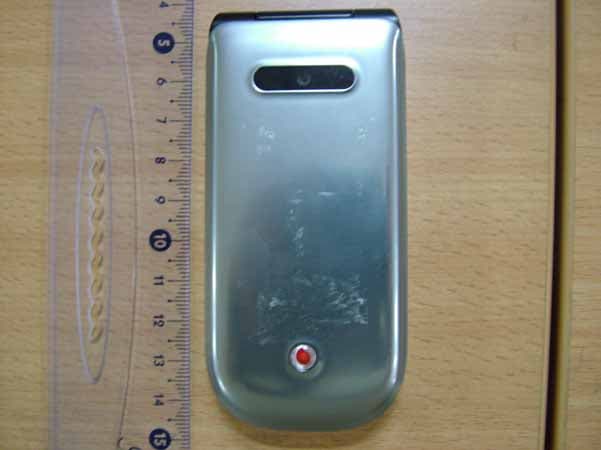
Click to zoom
Application Details
- Equipment Class
- PCE - PCS Licensed Transmitter held to ear
- Date of Grant
- Sep 12, 2007
- Application Purpose
- Original Equipment
- Date of Application
- Sep 12, 2007
- Equipment Note
- Mobile Phone
- Frequency Range
- 1850.20000000 - 1909.80000000
- Company
- Huawei Technologies Co.,Ltd
- Country
- China
Documents & Files
Document Text
Text extracted from the exhibit documents filed with the FCC. Open a document above to read the original.
Users Manual
30 9 Organiser & Tools This function provides you with various helpful tools. You can access the Organiser & Tools screen by selecting from the main menu. Alarms You can set several alarm clocks. You can also set alarm time, alarm tones and the cycle period for alarm clocks. Setting Alarm ClocksEnter alarm function, you can select one alarm from the list, and then press to set an alarm clock.In the screen for editing alarm clock, you can set the following items: alarm time, message, the sound function, the vibration function, Alert tone, the snooze function, the alarm cycle.Alarm PromptWhen it is time for an alarm clock to ring, the selected alarm tone is played and a prompt displayed. You can stop the ringing by pressing any key, or by closing or opening your phone. The prompt allows you to snooze or stop the alarm prompt.If your phone is powered off, the alarm clock will still ring. When the alarm rings, you can choose to power on the phone. Stopping the Alarm ClockSelect an alarm clock from the list, and press the left function key to deactivate it. Calendar With this function, you can view the calendar and manage your schedules.New ScheduleEnter calendar function, you can select Options > New to create the schedule events for the current day.In the screen for editing schedule, you can set the fol-lowing items: schedule subject, start/end time of the schedule, schedule location, schedule category, schedule content, whether the sound is on, the V720.book Page 30 Tuesday, August 28, 2007 9:26 AM Task 31 vibration function, alert tone, alert type, alert cycle, and alert image. Note You can create up to 500 schedules in total and 15 for each day. While creating a new schedule, you need to set the alarm on before setting the alarm time, the alarm cycle, the alarm tone and the image. Calendar FunctionsEnter calendar function and select Options . You can perform the following operations.• New: To create a new schedule.• Go to: To go to a certain date directly from the Month view screen. • Display: To view all event s, specified events, Calen- dar files and to back up all schedules to a memory card. • View mode: To view the calendar in three different modes: month view, week view, and day view. • Delete event: To delete all past events, specific period events or all events. • Management: To backup all schedules to the mem- ory card or to restore all schedules from the mem-ory card to the phone. • Settings: To set save location, main view, week begin day. • Memory status: To view the memory status, includ- ing the used space and the total space. Schedule PromptWhen it is time to remind you of a schedule, the selected ringtone is played and a prompt displayed. You can stop the ringing by pressing any key, or by closing or opening your phone. From the prompt, you can snooze or stop the prompt. Task You can define and manage tasks to be conducted before a certain time. Your phone can remind you of these tasks and track them automatically.Select Task from Organiser & To ols .The tasks are classified into three kinds: pending, done, and all V720.book Page 31 Tuesday, August 28, 2007 9:26 AM Memo 32 Organiser & Tools 9 tasks. You can define up to 1000 tasks on your phone.New TasksTo define a new task, press or select Options > New on the Tasks screen. In the screen for editing task, you can set the follow-ing items: the subject of the task, the deadline, the priority level, the task status, the task alert, the vibration function, the alert time, the task type. Tasks Functions On the Tasks screen, you can also perform the fol-lowing operations: edit, new, set as done, send by Message, Email or Bluetooth, copy, day view, delete, delete all, and view the memory status.Task PromptWhen it is time for the phone to remind you of a task, it rings automatically and a prompt interface is dis-played. You can stop the ringing by pressing any key, or by closing or opening your phone. From the prompt , you can snooze or stop the task prompt. Memo You can store important events on your phone. You can save up to 100 such memos.Select Memo from Organiser & Tools . If there is no memo, you need to create one when you access the Memo screen. On the Memo Pad screen, you can perform the fol-lowing operations: edit, new, delete, send by Mes-sage or Bluetooth, view the memory status and delete all. Synchronise You can synchronise contacts with your personal phone book in the Vodafone network. This service might not be available in all Vodafone networks. Contact your local Vodafone customer care centre. Select Synchronise from Organiser & Tools to create or edit a profile. Select Options > View log to view the latest synchronisation log. Before you use the synchronise function, you may need to set a pro-file. V720.book Page 32 Tuesday, August 28, 2007 9:26 AM Calculator 33 1 To create a profile, select Options > New to cre- ate a profile. 2 Press the left/right scroll key to switch between Synchronise Item, Server Setting, and Network Profile. 3 In the Synchronise Item screen, select the item to be synchronised and press to confirm it. Then, enter the database name, User name, and Password of the synchronisation items. 4 In the Server Setting screen, enter server address, user name, password. 5 In the Network profile screen, enter the proxy server address and the port. Then, enter the net-work access point and select a desired profile. 6 Return to the previous menu and select Options > Synchronise to start synchronising. Note This service is not available in all networks. For details, contact your local Vodafone customer care centre. Calculator You can perform addition, subtraction, multiplication, division and extraction operations on your phone.• Press the number keys to enter the figures.• Press the scroll key to enter the operators.• Press the left function key to clear.• Press the right function key to exit Calculator.• Press to enter a radix point. • Press to delete the character to the left of the cursor. • Press to…
Text truncated - open the document above for the full version.
Users Manual
Make the most of now. Vodafone 720 Mobile Phone User Guide V720.book Page 1 Tuesday, August 28, 2007 9:26 AM Notice Copyright © 2007 Huawei Technologies Co. Ltd.All Rights Reserved 1 Your Vodafone 720 is made exclusively for Vodafone by Huawei Technologies. 2 No part of this manual may be reproduced or transmitted in any form or by any means without prior written consent of Huawei Technologies Co. Ltd. 3 Trademarks 4 VODAFONE, the Vodafone logos, Vodafone Radio DJ are trade marks of the Vodafone Group. Other product and company names men-tioned herein may be trade marks of their respective owners. 5 Notice 6 The information in this manual is subject to change without notice. Every effort has been made in the prepar ation of this manual to ensure accuracy of the contents, but all statements, information, and recommendations in this man-ual do not constitute a warranty of any kind, expressed or implied. 7 Read the safety precautions carefully to ensure that you use wireless device in a correct and safe manner. For details, see the section "Warn-ings and Precautions". Huawei Technologies Co. Ltd.Branch Address: 8 Huawei Technologies Deutschland GmbH, Am Seestern 24, Dusseldorf, Germany 9 Postal Code: 40547 Head Office Address: 10 Administration Building, Huawei Technologies Co. Ltd., Bantian, Longgang District, 11 Shenzhen, P. R. China 12 Postal Code: 518129 Website: http://www.huawei.com V720.book Page 2 Tuesday, August 28, 2007 9:26 AM 13 Read the Safety Information section ofthis user guide on page 57. Do not use hand-held while driving.For body-worn operation maintain a separation of 1.5 cm.Small parts may cause a choking hazard.This device may produce a loud sound.Keep away from pacemakers and other personal medical devices.Switch off when instructed in hospitals and medical facilities.Switch off when instructed in aircrafts and airports. Do not use while re-fuelling.This device may produce a bright or flashing light.Do not dispose of in a fire.Avoid contact with magnetic media.Avoid Extreme TemperaturesAvoid contact with liquid, keep dry.Do not try and disassemble.Do not rely on this device for emergency communications. Safety Precautions V720.book Page 3 Tuesday, August 28, 2007 9:26 AM 1415 Specific Absorption Rate (SAR) 16 Your mobile device is a radio transmitter and receiver. It is designed not to exceed the limits for exposure to radio waves recommended by international guidelines. These guidelines were developed by the independent scientific organisation ICNIRP and include safety margins designed to assure the protection of all persons, regardless of age and health. 17 The guidelines use a unit of measurement known as the Specific Absorption Rate, or SAR. The SAR limit for mobile devices is 1.6 W/kg and the highest SAR value for this device when tested at the ear was 0. 385 W/kg*. As mobile devices offer a range of functions, they can be used in other positions, such as on the body as described in this user guide**. 18 As SAR is measured utilising the device's highest transmitting power, the actual SAR of this device while operating is typically below that indicated above. This is due to automatic changes to the power level of the device to ensure it only uses the minimum power required to communicate with the network. 19 * The tests are carried out in accordance with IEC standard PT62209-1. 20 ** Please see page 57 about body worn operation. 21 Please read the safety precautions carefully to ensure the correct and safe use of your wireless device. For detailed information, refer to the 22 section “Warnings and Precautions”. 2324 Switch off in explosive environments.Only use approved accessories. . V720.book Page 4 Tuesday, August 28, 2007 9:26 AM 1 1 Table of Contents Table of Contents 1Getting to Know Your Phone 1 Packing List ................................................1Your Phone ................................................2 Getting Started 6 Loading the SIM Card ................................6Unloading the SIM Card .............................7Charging the Battery ..................................7Loading/Removing a Memory Card............8Powering On/Off .........................................9 Call Service 11 Making or Answering Calls .......................11Operations During a Voice Call ...............12 Operations During a Video Call ...............13 Text Input 15 T9 ® Input Method ....................................15 Traditional Input Method ..........................15"123" Numeric Input Method ....................16Symbol Input Method ...............................16Input Different Languages ........................16 Contacts 17 Making Calls from the Contacts ...............17Searching for a Contact............................17Viewing Contacts in Phone/SIM ...............17Other Operations ......................................17Groups......................................................18 Calls 20 Making Calls from Calls ........................... 20Other Operations ..................................... 20 Messaging 21 Messages................................................. 21Email ........................................................ 23Broadcast Inbox ....................................... 26Vodafone Messenger ............................... 27Templates ................................................ 27 Music 28 Music Library............................................ 28Playlists .................................................... 29Vodafone Radio DJ .................................. 29Music Store .............................................. 29My Wishlist ............................................... 29 Organiser & Tools 30 Alarms ...................................................... 30Calendar .................................................. 30Task ......................................................... 31Memo ....................................................... 32Synchronise ..........................................…
Text truncated - open the document above for the full version.
Attestation Statements
2007-9-13 华为机密,未经许可不得扩散 第1页, 共1页 Statement We, Huawei Technologies Co.,Ltd. State that: HUAWEI WCDMA/GPRS/GSM MOBILE PHONE – V720/Vodafone 720/U5700 is subscriber equipment in the WCDMA/GSM system. The WCDMA frequency band is only Band I. The GSM/GPRS frequency band includes E-GSM900 and DCS1800 and PCS1900. So only PCS 1900 Can be used in U.S. territory.
Cover Letter(s)
Huawei Technologies Co., Ltd. Address:Huawei Industrial Base,Bantian Longgang,Shenzhen 518129, P.R China Post ZIP:518129 Page :1/1 To: EMCC Fax : NULL From:Zhang Xinghai Fax:0086-755-89652518 Tel:0086-755-89651014 Email address: [email protected] Http: www.huawei.com Subject:Letter of Confidentiality Federal Communications Commission 7435 Oakland Mills Road Columbia, MD 21046 Gentlemen: This letter is to comply with the Code of Federal Regulations Title 47 Section 0.457 and 0.459 pertaining to confidential material. Huawei Technologies Co., Ltd. would like the following documents regarding this submission for FCC ID: QISV720 to be kept confidential: 1. Schematic diagram & PCB layout. 2. Block Diagram. 3. Parts list (BOM) Information. 4. Operational description. 5. Turn-up procedure V720/Vodafone 720/U5700 is a WCDMA /GPRS/GSM Mobile Phone. The WCDMA frequency band is only Band I, The GSM/GPRS frequency band includes E-GSM900 and DCS1800 and PCS1900, so only PCS 1900MHz bands test data included in all the documents The above material contains trade secrets or technical data, which would customarily be guarded from competitors. We do not want these documents to be accessible to the general public. Sincerely, For and Behalf of: Huawei Technologies Co., Ltd. Zhang Xinghai EMC Laboratory Manager
Cover Letter(s)
Huawei Technologies Co., Ltd. Administration Building, Huawei Base, Bantian, Longgang District, Shenzhen 518129 P.R.C. +86 755 28780808 www.huawei.com Huawei internal reference RCT-US-01-01 USA FCC Short Term Confidentiality Request template Effective date: 2007-01-06 Version 1.1 Short Term Confidentiality Request 2007-08-12 Federal Communications Commission Office of Engineering and Technology Equipment Authorization Division 7345 Oakland Mills Road Columbia, Maryland 21046 Subject: SHORT-TERM Confidentiality Request for FCC ID: QISV720 Product Name: WCDMA/GPRS/GSM Mobile Phone Product Model: V720/Vodafone 720/U5700 To whom maybe concern: Pursuant to sections 0.457 and 0.459 of CFR 47 and to avoid premature release of sensitive information prior to marketing or release of the product to the public, Huawei Technologies Co., Ltd requests the following documents contained in this certification application be temporarily withheld from public disclosure for an initial period of 45days: 1. External Photos 2. Internal Photos 3. Test Setup Photos 4. Users Manual The applicant also acknowledges that they will also provide appropriate notice to EMCC should either of the following occur: A) If the applicant requires additional 45 day extension periods they will notify EMCC with a new request letter at least 7 days prior to the short-term confidentiality expiration date-[Note: up to maximum of 3 extensions only are allowed], or b) Immediately notify EMCC in the event the information regarding the product of the product is made available to the public. EMCC will then release the documents listed above for public disclosure pursuant to FCC Public Notice DA 04-1705. Sincerely, KangYing Regulation Compliance Manager Print name Signature Title
External Photos
V720/Vodafone 720/U5700 WCDMA/GPRS/GSM Mobile Phone SECRET Page1,Total 7 External Photo of V720/Vodafone 720/U5700 V720/Vodafone 720/U5700 WCDMA/GPRS/GSM Mobile Phone SECRET Page2,Total 7 V720/Vodafone 720/U5700 WCDMA/GPRS/GSM Mobile Phone SECRET Page3,Total 7 V720/Vodafone 720/U5700 WCDMA/GPRS/GSM Mobile Phone SECRET Page4,Total 7 V720/Vodafone 720/U5700 WCDMA/GPRS/GSM Mobile Phone SECRET Page5,Total 7 V720/Vodafone 720/U5700 WCDMA/GPRS/GSM Mobile Phone SECRET Page6,Total 7 V720/Vodafone 720/U5700 WCDMA/GPRS/GSM Mobile Phone SECRET Page7,Total 7
ID Label/Location Info
V720/Vodafone 720/U5700 WCDMA/GPRS/GSM Mobile Phone SECRET Page1,Total 1 Lable Info of V720/Vodafone 720/U5700 1. Lable of V720/Vodafone 720/U5700:
ID Label/Location Info
51.95 37.81 0.10 13.51 NOTES The material and surface finishing and coatings which used have to make satisfied the EU WEEE and RoHS directives. SCALE 1:1 Tolerance of linear Dimensions fine ISO 2768-f 0.5-3 ±0.05 3- 6 ±0.05 6- 30 ±0.1 30-120 ±0.15 120-400 ±0.2 400-1000 ±0.3 A4 A B C D E F 1234 1234 A B C D E DKBA88176802 RELEASE LEVEL: FILE NAME: REV ECO NO. DESCRIPTION 1 1 MASS(Kg): AND SHALL NOT BE REPRODUCED COPYIED THE PROPERTY OF HUAWEI TECH Co.LTD. THESE DRAWINGS AND SPECIFICATION ARE THE PRIOR WRITTEN CONSENT OF HUAWEI OR USED IN ANY MANNER WITHOUT TECH Co. LTD .XXX .XX .X ANG MAT'L: SHEET: HUAWEI TECHNOLOGIES Co.LTD APPD: STAD: DRAW: CHKD: DATE: DATE: DATE: DATE: SCALE: FINISH: UNIT'S: REV PRODUCT: PART NO.: DWG NO.: TITLE: OF F PHONE_LABEL LI RUIFENG2007-05-31MM DKBA8.817 6802 HU BIN2007-05-26 HONG NIYU2007-05-26 5165 0776 ZHONG GANG2007-05-261:1 VODAFONE720Fasson 72826 TFLASH CARD SIM-CARD 720
Internal Photos
V720/Vodafone 720/U5700 WCDMA/GPRS/GSM Mobile Phone SECRET Page1,Total 11 Internal Photo of V720/Vodafone 720/U5700 V720/Vodafone 720/U5700 WCDMA/GPRS/GSM Mobile Phone SECRET Page2,Total 11 V720/Vodafone 720/U5700 WCDMA/GPRS/GSM Mobile Phone SECRET Page3,Total 11 V720/Vodafone 720/U5700 WCDMA/GPRS/GSM Mobile Phone SECRET Page4,Total 11 V720/Vodafone 720/U5700 WCDMA/GPRS/GSM Mobile Phone SECRET Page5,Total 11 V720/Vodafone 720/U5700 WCDMA/GPRS/GSM Mobile Phone SECRET Page6,Total 11 V720/Vodafone 720/U5700 WCDMA/GPRS/GSM Mobile Phone SECRET Page7,Total 11 V720/Vodafone 720/U5700 WCDMA/GPRS/GSM Mobile Phone SECRET Page8,Total 11 V720/Vodafone 720/U5700 WCDMA/GPRS/GSM Mobile Phone SECRET Page9,Total 11 V720/Vodafone 720/U5700 WCDMA/GPRS/GSM Mobile Phone SECRET Page10,Total 11 V720/Vodafone 720/U5700 WCDMA/GPRS/GSM Mobile Phone SECRET Page11,Total 11
Test Report
Report No: SYBH(R) 82072007EB-1 Confidential Information of Huawei. No Distribution without Permission Page1, Total40 FCC TEST REPORT OF Huawei WCDMA/GPRS/GSM Mobile Phone M/N: V720/Vodafone 720/U5700 Jul, 19, 2007 Reliability Laboratory of Huawei Technologies Co., Ltd. All Right Reserved Report No: SYBH(R) 82072007EB-1 FCC ID: QISV720 Report No: SYBH(R) 82072007EB-1 Confidential Information of Huawei. No Distribution without Permission Page2, Total40 Notice 1. The laboratory has obtained the accreditation of China National Accreditation Committee for Laboratories (CNAL), and accreditation number: L0310. 2. The laboratory has obtained the accreditation of THE AMERICAN ASSOCIATION FOR LABORATORY ACCREDITATION (A2LA), and Accreditation Council Certificate Number: 2174.01. 3. The laboratory has been listed on the US Federal Communications Commission list of test facilities recognized to perform electromagnetic emissions measurements. The site recognition number is 97456. 4. The laboratory also has been listed by the VCCI to perform EMC measurements. The accreditation number is C1758, R1672, and T153. 5. The test report is invalid if not marked with "exclusive stamp for the test report". 6. Any copy of the test report is invalid if not re-marked with the "exclusive stamp for the test report". 7. The test report is invalid if not marked with the stamps or the signatures of the persons responsible for performing, revising and approving the test report. 8. The test report is invalid if there is any evidence of erasure and/or falsification. 9. If there is any dissidence for the test report, please file objection to the test centre within 15 days from the date of receiving the test report. 10. Normally, the test report is only responsible for the samples that have undergone the test. 11. Context of the test report cannot be used partially or in full for publicity and/or promotional purposes without previous written approval of the laboratory. Report No: SYBH(R) 82072007EB-1 Confidential Information of Huawei. No Distribution without Permission Page3, Total40 Huawei Technologies Co Ltd Huawei Industrial Base, Bantian Longgang Shenzhen 518128, P.R China Tel: +86 755 89651014 Fax: +86 755 89652518 REPORT ON FCC Test of Huawei WCDMA/GPRS/GSM Mobile Phone M/N: V720/Vodafone 720/U5700 Report No: SYBH(R) 45012007EB-1 REGULATION FCC CFR47 Part 2: Subpart J; FCC CFR47 Part 24: Subpart E; FCC CFR47 Part 15: Subpart B; CONCLUSION There are 10 items need to be tested, 10 items have been tested. The sample of the model completely meets the requirements Final Judgement: Pass General Manager 2007.07.20 Guo Xiaoqi Date Name signature Technical Responsibility For Area of Testing 2007.07.19 Zhang Xinghai Date Name signature Test Lab Engineer 2007.07.19 HuJun Date Name signature Report No: SYBH(R) 82072007EB-1 Confidential Information of Huawei. No Distribution without Permission Page4, Total40 Contents 1 Summary.................................................................................................................................................... 5 2 Product Description................................................................................................................................6 2.1 PRODUCTION INFORMATION................................................................................................................... 6 2.2 MODIFICATION INFORMATION.................................................................................................................. 6 3 Test Site Description................................................................................................................................. 7 3.1 TESTING PERIOD................................................................................................................................... 7 3.2 SET UP DESCRIPTION............................................................................................................................ 7 4 Product Description.................................................................................................................................. 8 4.1 TECHNICAL CHARACTERISTICS............................................................................................................... 8 4.2 EUT IDENTIFICATION LIST.................................................................................................................... 10 5 Main Test Instruments............................................................................................................................. 11 6 Transmitter Measurements..................................................................................................................... 12 6.1 EFFECTIVE RADIATED POWER OF TRANSMITTER (EIRP)........................................................................ 12 6.2 CONDUCTED POWER OF TRANSMITTER................................................................................................. 15 6.3 MODULATION CHARACTERISTICS.......................................................................................................... 17 6.4 OCCUPIED BANDWIDTH........................................................................................................................ 19 6.5 BAND EDGES COMPLIANCE.................................................................................................................. 21 6.6 SPURIOUS EMISSION AT ANTENNA TERMINAL........................................................................................ 23 6.7 RADIATED SPURIOUS EMISSION........................................................................................................... 25 6.8 FREQUENCY STABILITY........................................................................................................................ 29 7 EMC Test.................................................................................................................................................. 35 7…
Text truncated - open the document above for the full version.
Test Setup Photos
FCC ID: QISV720 Report No: SYBH (R) 82072007EB-1 Confidential Information of Huawei. No Distribution without Permission Page1, Total5 Appendix H Photos of Test Setup FCC ID: QISV720 Report No: SYBH (R) 82072007EB-1 Confidential Information of Huawei. No Distribution without Permission Page2, Total5 1 Radiated Emissions Radiated Disturbance 2 Radiated Spurious Emissions FCC ID: QISV720 Report No: SYBH (R) 82072007EB-1 Confidential Information of Huawei. No Distribution without Permission Page3, Total5 Radiated Spurious Emission (below 2GHz) FCC ID: QISV720 Report No: SYBH (R) 82072007EB-1 Confidential Information of Huawei. No Distribution without Permission Page4, Total5 Radiated Spurious Emission (2GHz to18GHz) FCC ID: QISV720 Report No: SYBH (R) 82072007EB-1 Confidential Information of Huawei. No Distribution without Permission Page5, Total5 Radiated Spurious Emission (above 18GHz) 3 Conducted Emissions Conducted Emissions for AC Ports
Contact Information
Applicant
Zhang Xinghai
Test Firm
Huawei Technologies Co., LTDZhou Fengyum
Technical Specifications
| # | Rule Parts | Frequency Range | Power Output | Emission | Tolerance |
|---|---|---|---|---|---|
| 1 | 24E | 1.85 GHz - 1.91 GHz | 1.778 W | 300KGXW | 0.0180000000 ppm |
Other Applications from Huawei Technologies Co.,Ltd

QISSUN2000
Jun 27, 2021Solar Inverter
Equipment Class
DTS - Digital Transmission System
QISCP81-1
Oct 22, 2020Watch Wireless Charger
Equipment Class
DCD - Part 15 Low Power Transmitter Below 1705 kHz
QISRRU3278
Sep 02, 2020Remote Radio Unit
Equipment Class
CBD - Citizens Band Category A and B Devices
QISR2561
Jul 11, 2020Indoor Router
Equipment Class
DTS - Digital Transmission System
QISSMARTLOGGER310
Mar 23, 2020Solar Smart Monitor & Data Logger
Equipment Class
DTS - Digital Transmission System