QISWS880802.11ac Wireless Router
Huawei Technologies Co.,Ltd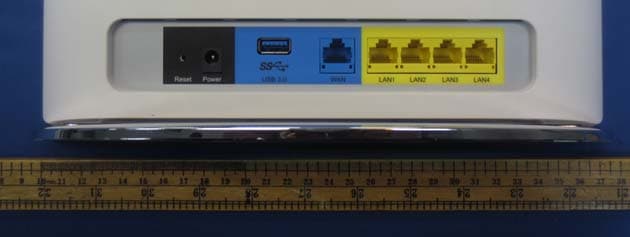
Click to zoom
Application Details
- Equipment Class
- DTS - Digital Transmission System
- Date of Grant
- Feb 15, 2015
- Application Purpose
- Original Equipment
- Date of Application
- Feb 15, 2015
- Equipment Note
- 802.11ac Wireless Router
- Frequency Range
- 2412.00000000 - 2462.00000000
- Company
- Huawei Technologies Co.,Ltd
- Country
- China
Documents & Files
Document Text
Text extracted from the exhibit documents filed with the FCC. Open a document above to read the original.
Users Manual
1. View SSID and WLAN key After you connect the WS880 to a power socket, check whether the indicator turns on. If the indicator does not turn on, press and hold the power button for 3 seconds or more. Check whether the WS880 indicator is working properly based on the following table. If the indicator does not work as expected, verify that the cables are properly connected. If you are accessing the Internet using a digital subscriber line (DSL) connection, connect the cables in the sequence of 1 to 7 . If you are accessing the Internet using an Ethernet connection (network cable), connect the cables in the sequence of 4 > 5 > 7 . 16:30 15:30 16:30 Windows 7 Windows 7Windows XPWindows XP ATe l e p h o n e wall jack BTelephone CSplitter DModem E Network port FComputer GLaptop HTablet IPhone POWER LAN RESET ADSL USB 3.0 4 4 5 6 7 3 2 1 A B C E I H G F D network cable network cable DSL 802.11ac Wireless Router Quick Start WS880 Local Area Connection Disable Status Diagnose Bridge Connections Create Shortcut Delete Rename Properties Internet Protocol Version 4 (TCP/IPv4) Properties You can ger IP settings assigned automatically if your nerwork supports this capability.Otherwise,you need to ask your network adminstrator for the appropriate IP settings. General Alternate Configuration Obtain an IP address automatically Use the following IP address: IP address: Subnet mask: Default gateway: Obtain DNS sever address automatically Use the following DNS sever address: Preferred DNS server: Alternate DNS server: Validate settings upon exit Advanced... OKCancel . . . . . . . . . . . . . . . Local Area Connection 10 Properties Networking Sharing OK Cancel Connect using Configure... Install... Description Trasmission Control Protocol/Internet Protocol.The default wide area network protocol that provides communication across diverse interconnected networks. UninstallProperties This connection uses the following items: Generic Marvell Yukon 88E8070 based Ethernet Controlle Client for Microsoft Networks Flie and Printer Sharing for Microsoft Networks Internet Protocol Version 6 (TCP/IPv6) Internet Protocol Version 4 (TCP/IPv4) Link-Layer Topology Discovery Mapper I/O Driver Link-Layer Topology Discovery Responder Qos Packet Scheduler Currently connected to: Network 40 Open Network and Sharing Center Internet access Local Area Connection Properties Local Area Connection Properties General Description Show icon in notification area when connected Notify me when this connection has limited or no connectivity Transmission Control Protocol/Internet Protocol.The default wide area network protocol that provides communication across diverse interconnected networks. Connect using: This connection uses the following items: Realtek EAPPkt Protocol AEGIS Protocol (IEEE 802.1x)v3.7.5.0 Internet Protocol(TCP/IP) Intel(R) Gigabit CT Desktop Adapter Configure... Install... UninstallProperties Advanced OK Cancel ? X Internet Protocol (TCP/IP) Properties Internet Protocol (TCP/IP) Properties You can ger IP settings assigned automatically if your nerwork supports this capability.Otherwise,you need to ask your network adminstrator for the appropriate IP settings. General Alternate Configuration Obtain an IP address automatically Use the following IP address: IP address: Subnet mask: Default gateway: Obtain DNS sever address automatically Use the following DNS sever address: Preferred DNS server: Alternate DNS server: Advanced... OKCancel . . . . . . . . . . . . . . . ? X Local Area Connection Status Local Area Connection Status General Connection Status:Connected 00:00:45 252191 100.0 Mbps Duration: Speed: Sent Received Activity Packets: Disable Properties Support Close ? X Not connected Connections are available 连接(C) Open Network and Sharing Center Wireless Network Connection 3 HUAWEI-xxxxxx ConnectConnect automatically Connect to a Network Security key: You can also connect by pushing the button on the router. Hide characters Type the network security key CancelOK Currently connected to: Huawei HUAWEI-xxxxxx No Internet access Open Network and Sharing Center Wireless Network Connection 3 Connected Wireless Network Connection Wireless Network Connection ConnectCancel X The network “huawei” requires a network key (also called a WEP key or WPA key).A nerwork key helps prevent unknown intruders from connecting to this network. Type the key,and then click Connect. Network key: Confirm network key: Wireless Network Connection Wireless Network Connection Connect X Choose a wireless network Click an item in the list below to connect to a wireless network in range or get more information. Security-enabled wireless network(WPA2) Connected HUAWEI-xxxxxx X Choose a wireless network Click an item in the list below to connect to a wireless network in range or get more information. To connect to this network,click Connect.You might need to enter additional information. Security-enabled wireless network(WPA2) HUAWEI-xxxxxx Wireless Network Connection Wireless Network Connection Connect Indicator Working Steady on LAN Steady on (any of the LAN1 to LAN4 ports connected to a computer.) INTERNETSteady on WLANSteady on Internet using a DSL Internet using an Ethernet connection Before configuring the router, you need to build the network connection between this device and the router. Wired connection applies to the computers without wireless network adapter. Wireless connection applies to the devices supporting wireless Internet access, such as smart phone and tablet. ModeI Wired connection Mode II Wireless connection Please ensure that your computer has installed and enabled the wireless network adapter. 1. Click in the lower right corner of your desktop. 2. In the displayed dialog box, click Properties . 3. D o u b l e - c l i c k I n t e r n e t Protocol (TCP/IP) . 4. Select Obtain an IP address automatically and Obtain DNS server address automatically . Click OK . 1. Click in the lower right corner of your desktop, choose Open Network and S…
Text truncated - open the document above for the full version.
Cover Letter(s)
文档名称 文档密级 华为保密信息,未经授权禁止扩散 第1页, 共1页 To whom it may concern, Letter of Agency I, an officer of HUAWEI TECHNOLOGIES CO.,LTD do hereby authorize Intertek Testing Services (Mr. Shawn Xing) to act on our behalf in front of the Federal Communications Commission with respect to all matters relating to certification of equipment under Part 15 and/or Part 95 of the FCC Rules until further notice. I further certify that no party (as defined in §1.2002(b) of CFR 47, 2007) to this application, including myself, is subject to a denial of federal benefits, that includes FCC benefits, pursuant to Section 5301 of the Anti-Drug Abuse Act of 1988, 21 U.S.C., 862. Regards, Zhang xinghai EMC Laboratory Manager
Cover Letter(s)
文档名称 文档密级 华为保密信息,未经授权禁止扩散 第1页, 共1页 To whom it may concern, Request for Permanent Confidentiality Under FCC Part 15 Certification FCC ID: QISWS880 Request is hereby submitted by Huawei Technologies Co., Ltd. to withhold permanently from public review certain portions of the application for equipment certification for the referenced FCC identifiers. This request for confidentiality is made pursuant to 47 CFR § 0.457(d) and 0.459 of the FCC Rules. In particular, the following sections of the application are to be kept permanently confidential and Huawei Technologies Co., Ltd. reserves the right to discern which parties can obtain access to these information: Schematics / Partlist Detailed Block diagrams Detailed Operational/Functional Description The rationale for request for confidentiality is as followings: This information represents intellectual property of Huawei Technologies Co., Ltd.and it is subject to competition. We have invested considerable time and materials in research and development to produce the referenced product. Disclosure of the permanently confidential portions of this application to competitors would not only give them significant competitive advantages in developing similar products, but would also disclose successful implementation of unpublished, leading edge technology developed by us. If you have questions or need further information, please contact the undersigned. Regards, Zhang Xinghai EMC Laboratory Manager
External Photos
Label location
ID Label/Location Info
Label location Liluying Zhangbin Qiumeiling Luoxuanyu WS880 WS880产品铭牌(美国通用) 4*R1.0mm 示意图 丝印内容 Black White 7.0 mm 6.4 mm 5.0 mm 50#哑白PET 0678 70.00 mm 4 6 . 0 0 m m 红色内容为产线打印(红色内容仅为示意,内容可能变化,具体内容以产线要求为准),须卷装来料。 0.2 Model: WS880 Name: 802.11ac Wireless Router Power Rating: 12V;3A Username: admin Password: admin HUAWEI TECHNOLOGIES CO., LTD. MADE IN CHINA S/N:XXXXXXXXXXXXXXXX MAC:XXXXXXXXXXXX XX SSID(5G):HUAWEI-XXXXXX-5G WLAN Key:XXXXXXXXXX SSID:HUAWEI-XXXXXX FCC ID:QISWS880 This device complies with Part 15 of the FCC Rules. Operation is subject to the following two conditions: (1)this device may not cause harmful interference, and (2)this device must accept any interference received, including interference that may cause undesired operation. 0678 WEB Address: http://mediarouter.home
RF Exposure Info
FCC ID: QISWS880 RF Exposures Evaluation for single antenna transmissions WS880 is 802.11ac Wireless Router equipment with WiFi function. CPU is BCM 4708 chipset, 2.4G wifi PA is BCM4331, 5G wifi PA is BCM4360 and support 3Tx & 3Rx for 2.4G/5G band.. For more detailed features description, please refer to the user’s manual. Antenna information Antenna No.: 6, 3 antennas (Ant0/1/2) for 2.4G band; 3 antennas (Ant0/1/2) for 5G band. Antenna Gain: 2.4G band Ant0/1/2: 2dBi, 5G band Ant0/1/2: 2dBi When product operates on SISO mode 802.11b/g/n-HT20/40 (2.4G band) & 802.11a/n-HT20/40/ac mode (5G band), only one Ant0 (2.4G band Ant0 & 5G band Ant0) is used for transmission. When product operates on MIMO mode (2Tx) can form 3 MIMO mode (2.4G/5G, Ant0+Ant1 or Ant1+Ant2 or Ant0+Ant2) under the 802.11n-HT20/40/ac, If the receiver sensitivity has meet internal limit valve, the antenna of EUT will auto transfer to the another antenna. When product operates on MIMO mode (3Tx) can form 1 MIMO mode (2.4G/5G, Ant0+Ant1+Ant2). Maximum Peak conducted power 2.4G band SISO 802.11b SISO mode nominal Peak conducted power (Ant0): 18±1dBm; 802.11g SISO mode nominal Peak conducted power (Ant 0): 23±1dBm; 802.11n-HT20 SISO mode nominal Peak conducted power (ANT 0): 22±1dBm; 802.11n-HT40 SISO mode nominal Peak conducted power (ANT 0): 19±1dBm; 2.4G band MIMO 2Tx 802.11n-HT20 nominal Peak conducted power single Antenna (MIMO): 22±1dBm; 802.11n-HT40 nominal Peak conducted power single Antenna (MIMO): 22±1dBm; 2.4G band MIMO 3Tx 802.11n-HT20 nominal Peak conducted power single Antenna (MIMO): 22±1dBm; 802.11n-HT40 nominal Peak conducted power single Antenna (MIMO): 18±2dBm; 5.8G band SISO 802.11a SISO mode nominal Peak conducted power (Ant0): 24±1dBm; 802.11n-HT20 SISO mode nominal Peak conducted power (ANT 0): 24±1dBm; 802.11n-HT40 SISO mode nominal Peak conducted power (ANT 0): 24±1dBm; 802.11ac SISO mode nominal Peak conducted power (ANT 0): 22±1dBm; 5.8G band MIMO 2Tx 802.11n-HT20 nominal Peak conducted power single Antenna (MIMO): 22±2dBm; 802.11n-HT40 nominal Peak conducted power single Antenna (MIMO): 22±1dBm; 802.11ac nominal Peak conducted power single Antenna (MIMO): 21±1dBm; 5.8G band MIMO 3Tx 802.11n-HT20 nominal Peak conducted power single Antenna (MIMO): 22±2dBm; 802.11n-HT40 nominal Peak conducted power single Antenna (MIMO): 22±2dBm; 802.11ac nominal Peak conducted power single Antenna (MIMO): 21±2dBm; 5.2G band SISO 802.11a SISO mode nominal Peak conducted power (Ant0): 9±1dBm; 802.11n-HT20 SISO mode nominal Peak conducted power (ANT 0): 9±1dBm; 802.11n-HT40 SISO mode nominal Peak conducted power (ANT 0): 10±1dBm; 802.11ac SISO mode nominal Peak conducted power (ANT 0): 10±1dBm; 5.2G band MIMO 2Tx 802.11n-HT20 nominal Peak conducted power single Antenna (MIMO): 8±3dBm; 802.11n-HT40 nominal Peak conducted power single Antenna (MIMO): 8±3dBm; 802.11ac nominal Peak conducted power single Antenna (MIMO): 8±3dBm; 5.2G band MIMO 3Tx 802.11n-HT20 nominal Peak conducted power single Antenna (MIMO): 8±3dBm; 802.11n-HT40 nominal Peak conducted power single Antenna (MIMO): 8±3dBm; 802.11ac nominal Peak conducted power single Antenna (MIMO): 8±3dBm; Antenna photo Modulation Type: DBPSK, DQPSK, BPSK, QPSK, 16QAM, 64QAM. According to FCC Part 2.1091, this unlicensed transmitting devices is categorically excluded from routine environmental evaluation for RF exposure prior to equipment authorization or use, According to the KDB 447498 and OET 65, the simple calculation as below: SISO Mode MPE Evaluation: For Maximum Permissible Exposure (MPE) evaluation of the product, the maximum power density at 20 cm from this transmitter shall be less than the General Population / Uncontrolled MPE limit in FCC Part 1.1310. 5G Band Ant2 Ant1 Ant0 2.4G Band Ant0 Ant1 Ant2 5G Band Ant2 9.2, 7 (cm) 0, 0 5G Band Ant1 12.8, 3 (cm) 2.4G Band Ant1 12.8, -2.2 (cm) 2.4G Band Ant0 -7.7, 7 (cm) 2.4G Band Ant2 -12.5, -2.2 (cm) 5G Band Ant0 -12.5, 3 (cm) X X X X X X The maximum EIRP= 24+1+2=27dBm=501.2mW From above data, the exposed power density at a distance (R) of 20cm from the center of radiation of the antenna can be calculated according to OET Bulletin 65 as follow: = EIRP / 4πR^2 = 501.2 / 4πR^2 = 0.0998 mW/cm^2 The MPE limit is 1.0 mWcm-2 for general population and uncontrolled exposure in the range of 1.5GHz~100GHz according to FCC Part 1.1310. As the measured power density at 20cm from the transmitter is lower than the MPE limit, the compliance to the MPE limit can be ensured by indicating the minimum 20cm separation between the transmitter's radiating structure and body of the user or nearby persons. Transmitter Duty Cycle Calculation The EUT transmit continuously during the test, the duty cycle is 1. The following RF exposure statement or similar sentence is proposed to be included in the user manual: “FCC RF Radiation Exposure Statement Caution: This Transmitter must be installed to provide a separation distance of at least 20 cm from all persons.” FCC ID: QISWS880 RF Exposures Evaluation for Multi antenna transmissions The KDB 447498: A Mobile Multi-transmitter MPE Estimation MPE spreadsheet is used for estimating MPE limits for these 6 antennas (2.4G band 3 Antennas/5G band 3 Antennas) simultaneous transmission. The information of operating frequency (MHz), power (W), antenna gain (dBi), location (X and Y coordinates showed on page 2) for each antenna are entered in the MPE spreadsheet. The power densities of up to 6 antennas located within a 90 cm² region at 1cm intervals are estimated first. Then the power densities computed for each antenna are summed. The plot “% MPE Contour” displays the result in percentages of the frequency-dependent power density limits. As the measured power density at 20cm from the transmitter is lower than the MPE limit (the compliance boundary for simultaneous transmission), the compliance to the MPE limit can be ensured by indicating the minimum 20cm separation between the transmitter’s radiating str…
Text truncated - open the document above for the full version.
Test Report
SISO MODE 802.11b 2412MHz Ant0 2437MHz Ant0 24612MHz Ant0 802.11g 2412MHz Ant0 2437MHz Ant0 2462MHz Ant0 802.11n‐HT20 2412MHz Ant0 2437MHz Ant0 2462MHz Ant0 802.11n‐HT40 2412MHz Ant0 2437MHz Ant0 2462MHz Ant0 MIMO MODE (2TX, Ant0+Ant1 or Ant1+Ant2 or Ant0+Ant2) 802.11n‐HT20 2412MHz Ant0 2412MHz Ant1 2412MHz Ant2 2437MHz Ant0 2437MHz Ant1 2437MHz Ant2 2462MHz Ant0 2462MHz Ant1 2462MHz Ant2 802.11n‐HT40 2422MHz Ant0 2422MHz Ant1 2422MHz Ant2 2437MHz Ant0 2437MHz Ant1 2437MHz Ant2 2452MHz Ant0 2452MHz Ant1 2452MHz Ant2 MIMO MODE (3TX, Ant0+Ant1+Ant2) 802.11n‐HT20 2412MHz Ant0 2412MHz Ant1 2412MHz Ant2 2437MHz Ant0 2437MHz Ant1 2437MHz Ant2 2462MHz Ant0 2462MHz Ant1 2462MHz Ant2 802.11n‐HT40 2422MHz Ant0 2422MHz Ant1 2422MHz Ant2 2437MHz Ant0 2437MHz Ant1 2437MHz Ant2 2452MHz Ant0 2452MHz Ant1 2452MHz Ant2
Contact Information
Applicant
Zhang Xinghai
Technical Contact
Intertek Testing Services Shenzhen Ltd. Kejiyuan BShawn Xing
[email protected](86-755) 8614 0603
6F, D Block, Huahan Building, Langshan Road · Shenzhen · China
Non-Technical Contact
Intertek Testing Services Shenzhen Ltd. Kejiyuan BShawn Xing
[email protected](86-755) 8614 0603
Test Firm
Intertek Testing Services Shenzhen Ltd.Shawn Xing
Technical Specifications
| # | Rule Parts | Frequency Range | Power Output |
|---|---|---|---|
| 1 | 15C | 2.41 GHz - 2.46 GHz | 458.00 mW |
Other Applications from Huawei Technologies Co.,Ltd

QISSUN2000
Jun 27, 2021Solar Inverter
Equipment Class
DTS - Digital Transmission System
QISCP81-1
Oct 22, 2020Watch Wireless Charger
Equipment Class
DCD - Part 15 Low Power Transmitter Below 1705 kHz
QISRRU3278
Sep 02, 2020Remote Radio Unit
Equipment Class
CBD - Citizens Band Category A and B Devices
QISR2561
Jul 11, 2020Indoor Router
Equipment Class
DTS - Digital Transmission System
QISSMARTLOGGER310
Mar 23, 2020Solar Smart Monitor & Data Logger
Equipment Class
DTS - Digital Transmission System