RXZ-WR750RWireless Router
Pro-Nets Technology Corporation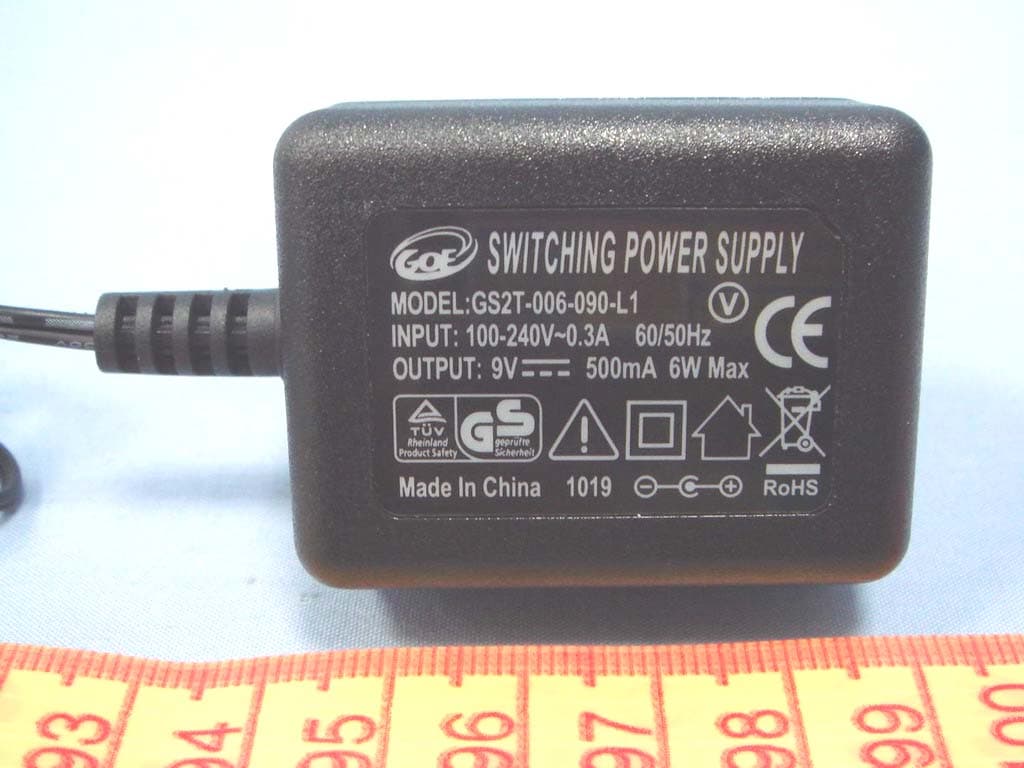
Click to zoom
Application Details
- Equipment Class
- DTS - Digital Transmission System
- Date of Grant
- Sep 15, 2010
- Application Purpose
- Original Equipment
- Date of Application
- Sep 15, 2010
- Equipment Note
- Wireless Router
- Frequency Range
- 2422.00000000 - 2452.00000000
- Country
- Taiwan
Documents & Files
Document Text
Text extracted from the exhibit documents filed with the FCC. Open a document above to read the original.
Users Manual
...∑ƪ¥ª≠≠ Œ± ́ ̈ªÆ À≠ªÆé≠ ”ø≤ ́ø¥ ...ŒÈÎŒ Ã∏∑≠ ªØ ́∑∞≥ª≤ ̈ ∏ø≠ 檪≤ ̈ª≠ ̈ªº ø≤º ∫± ́≤º ̈± Ω±≥∞¥ß ©∑ ̈∏ ̈∏ª ¥∑≥∑ ̈≠ ∫±Æ ø ›¥ø≠≠ fi º∑π∑ ̈ø¥ ºª™∑ΩªÙ ∞ ́Æ≠ ́ø≤ ̈ ̈± ∞øÆ ̈ ÔÎ ±∫ ̈∏ª ⁄›› Œ ́¥ª≠Ú Ã∏ª≠ª ¥∑≥∑ ̈≠ øƪ ºª≠∑π≤ªº ̈± ∞Ʊ™∑ºª ƪø≠±≤ø楪 ∞Ʊ ̈ªΩ ̈∑±≤ øπø∑≤≠ ̈ ∏øÆ≥∫ ́¥ ∑≤ ̈ªÆ∫ªÆª≤Ωª ∑≤ ø ƪ≠∑ºª≤ ̈∑ø¥ ∑≤≠ ̈ø¥¥ø ̈∑±≤Ú Ã∏∑≠ ªØ ́∑∞≥ª≤ ̈ πª≤ªÆø ̈ª≠Ù ́≠ª≠Ù ø≤º Ωø≤ Æøº∑ø ̈ª Æøº∑± ∫ÆªØ ́ª≤Ωß ª≤ªÆπß ø≤ºÙ ∑∫ ≤± ̈ ∑≤≠ ̈ø¥¥ªº ø≤º ́≠ªº ∑≤ øΩΩ±Æºø≤Ωª ©∑ ̈∏ ̈∏ª ∑≤≠ ̈Æ ́Ω ̈∑±≤≠Ù ≥øß Ωø ́≠ª ∏øÆ≥∫ ́¥ ∑≤ ̈ªÆ∫ªÆª≤Ωª ̈± Æøº∑± Ω±≥≥ ́≤∑Ωø ̈∑±≤Ú ÿ±©ª™ªÆÙ ̈∏ªÆª ∑≠ ≤± π ́øÆø≤ ̈ªª ̈∏ø ̈ ∑≤ ̈ªÆ∫ªÆª≤Ωª ©∑¥¥ ≤± ̈ ±ΩΩ ́Æ ∑≤ ø ∞øÆ ̈∑Ω ́¥øÆ ∑≤≠ ̈ø¥¥ø ̈∑±≤Ú ◊∫ ̈∏∑≠ ªØ ́∑∞≥ª≤ ̈ º±ª≠ Ωø ́≠ª ∏øÆ≥∫ ́¥ ∑≤ ̈ªÆ∫ªÆª≤Ωª ̈± Æøº∑± ±Æ ̈ª¥ª™∑≠∑±≤ ÆªΩª∞ ̈∑±≤Ù ©∏∑Ω∏ Ωø≤ æª ºª ̈ªÆ≥∑≤ªº æß ̈ ́Æ≤∑≤π ̈∏ª ªØ ́∑∞≥ª≤ ̈ ±∫∫ ø≤º ±≤Ù ̈∏ª ́≠ªÆ ∑≠ ª≤Ω± ́Æø㦧 ̈± ̈Æß ̈± Ω±ÆÆªΩ ̈ ̈∏ª ∑≤ ̈ªÆ∫ªÆª≤Ωª æß ±≤ª ±Æ ≥±Æª ±∫ ̈∏ª ∫±¥¥±©∑≤π ≥ªø≠ ́ƪ≠Ê Œª±Æ∑ª≤ ̈ ±Æ ƪ¥±Ωø ̈ª ̈∏ª ÆªΩª∑™∑≤π ø≤ ̈ª≤≤øÚ ◊≤Ωƪø≠ª ̈∏ª ≠ª∞øÆø ̈∑±≤ æª ̈©ªª≤ ̈∏ª ªØ ́∑∞≥ª≤ ̈ ø≤º ÆªΩª∑™ªÆÚ ›±≤≤ªΩ ̈ ̈∏ª ªØ ́∑∞≥ª≤ ̈ ∑≤ ̈± ø≤ ± ́ ̈¥ª ̈ ±≤ ø Ω∑ÆΩ ́∑ ̈ º∑∫∫ªÆª≤ ̈ ∫Ʊ≥ ̈∏ø ̈ ̈± ©∏∑Ω∏ ›±≤≠ ́¥ ̈ ̈∏ª ºªø¥ªÆ ±Æ ø≤ ª®∞ªÆ∑ª≤Ωªº Æøº∑±Òà ̈ªΩ∏≤∑Ω∑ø≤ ∫±Æ ∏ª¥∞Ú ̈∏ª ÆªΩª∑™ªÆ ∑≠ Ω±≤≤ªΩ ̈ªºÚ ⁄›› ›ø ́ ̈∑±≤Ê fl≤ß Ω∏ø≤πª≠ ±Æ ≥±º∑∫∑Ωø ̈∑±≤≠ ≤± ̈ ª®∞ƪ≠≠¥ß ø∞∞Ʊ™ªº æß ̈∏ª ∞øÆ ̈ß Æª≠∞±≤≠∑楪 ∫±Æ Ω±≥∞¥∑ø≤Ωª Ω± ́¥º ™±∑º ̈∏ª ́≠ªÆé≠ ø ́ ̈∏±Æ∑ ̈ß ̈± ±∞ªÆø ̈ª ̈∏∑≠ ªØ ́∑∞≥ª≤ ̈Ú Ã∏∑≠ ºª™∑Ωª Ω±≥∞¥∑ª≠ ©∑ ̈∏ –øÆ ̈ ÔÎ ±∫ ̈∏ª ⁄›› Œ ́¥ª≠Ú —∞ªÆø ̈∑±≤ ∑≠ ≠ ́æ∂ªΩ ̈ ̈± ̈∏ª ∫±¥¥±©∑≤π ̈©± Ω±≤º∑ ̈∑±≤≠Ê ̄Ô ̃ Ã∏∑≠ ºª™∑Ωª ≥øß ≤± ̈ Ωø ́≠ª ∏øÆ≥∫ ́¥ ∑≤ ̈ªÆ∫ªÆª≤ΩªÙ ø≤º ̄Ó ̃ ̈∏∑≠ ºª™∑Ωª ≥ ́≠ ̈ øΩΩª∞ ̈ ø≤ß ∑≤ ̈ªÆ∫ªÆª≤Ωª ÆªΩª∑™ªºÙ ∑≤Ω¥ ́º∑≤π ∑≤ ̈ªÆ∫ªÆª≤Ωª ̈∏ø ̈ ≥øß Ωø ́≠ª ́≤ºª≠∑ƪº ±∞ªÆø ̈∑±≤Ú ◊”–—ŒÃfl“à “—Ã¤Ê ⁄›› Œøº∑ø ̈∑±≤ ¤®∞±≠ ́ƪ Õ ̈ø ̈ª≥ª≤ ̈Ê Ã∏∑≠ ªØ ́∑∞≥ª≤ ̈ Ω±≥∞¥∑ª≠ ©∑ ̈∏ ⁄›› Æøº∑ø ̈∑±≤ ª®∞±≠ ́ƪ ¥∑≥∑ ̈≠ ≠ª ̈ ∫±Æ ̈∏ ∫±Æ ø≤ ́≤Ω±≤ ̈Ʊ¥¥ªº ª≤™∑Ʊ≤≥ª≤ ̈Ú Ã∏∑≠ ªØ ́∑∞≥ª≤ ̈ ≠∏± ́¥º æª ∑≤≠ ̈ø¥¥ªº ø≤º ±∞ªÆø ̈ªº ©∑ ̈∏ ø ≥∑≤∑≥ ́≥ º∑≠ ̈ø≤Ωª ±∫ øæ± ́ ̈ ª∑π∏ ̈ ∑≤Ω∏ª≠ ̄ÓΩ≥ ̃ æª ̈©ªª≤ ̈∏ª Æøº∑ø ̈±Æ ø≤º ß± ́Æ æ±ºßÚ Ã∏∑≠ ̈Æø≤≠≥∑ ̈ ̈ªÆ ≥ ́≠ ̈ ≤± ̈ æª Ω±Û¥±Ωø ̈ªº ±Æ ±∞ªÆø ̈ªº ∑≤ Ω±≤∂ ́≤Ω ̈∑±≤ ©∑ ̈∏ ø≤ß ± ̈∏ªÆ ø≤ ̈ª≤≤ø ±Æ ̈Æø≤≠≥∑ ̈ ̈ªÆÚ ◊¤¤¤ËÓÚÔÔæ ±Æ ËÓÚÔÔπ ±∞ªÆø ̈∑±≤ ±∫ ̈∏∑≠ ∞Ʊº ́Ω ̈ ∑≤ ̈∏ª ÀÕfl ∑≠ ∫∑Æ≥©øƪۥ∑≥∑ ̈ªº ̈± Ω∏ø≤≤ª¥≠ Ô ̈∏Ʊ ́π∏ ÔÔÚ “± ̈∑Ωª ›∏ø≤πª≠ ±Æ ≥±º∑∫∑Ωø ̈∑±≤≠ ̈± ̈∏ª ªØ ́∑∞≥ª≤ ̈Ù ©∏∑Ω∏ øƪ ≤± ̈ ø∞∞Ʊ™ªº æß ̈∏ª ∞øÆ ̈ß Æª≠∞±≤≠∑楪 ∫±Æ Ω±≥∞¥∑ø≤Ωª Ω± ́¥º ø∫∫ªΩ ̈ ̈∏ª ́≠ªÆ ̆≠ ø ́ ̈∏±Æ∑ ̈ß ̈± ±∞ªÆø ̈ª ̈∏ª ªØ ́∑∞≥ª≤ ̈Ú ›±≥∞ø≤ß ∏ø≠ ø≤ ±≤Ûπ±∑≤π ∞±¥∑Ωß ±∫ ́∞πÆøº∑≤π ∑ ̈≠ ∞Ʊº ́Ω ̈≠ ø≤º ∑ ̈ ≥øß æª ∞±≠≠∑楪 ̈∏ø ̈ ∑≤∫±Æ≥ø ̈∑±≤ ∑≤ ̈∏∑≠ º±Ω ́≥ª≤ ̈ ∑≠ ≤± ̈ ́∞Û ̈±Ûºø ̈ªÚ –¥ªø≠ª Ω∏ªΩμ ©∑ ̈∏ ß± ́Æ ¥±Ωø¥ º∑≠ ̈Æ∑æ ́ ̈±Æ≠ ∫±Æ ̈∏ª ¥ø ̈ª≠ ̈ ∑≤∫±Æ≥ø ̈∑±≤Ú ! Is herewith confirmed to comply with the requirements set out in the Council Directive on the Approximation of the Laws of the Member States relating to Electromagnetic Compatibility (2004/108/EC), Low-voltage Directive (2006/95/EC), the procedures given in European Council Directive 99/5/EC and 2004/104/EC. The equipment was passed. The test was performed according to the following European standards: EN 300 328 V.1.7.1 EN 301 489-1 V.1.8.1/ EN 301 489-17 V.2.1.1 EN62311 EN 60950-1 Regulatory statement (R&TTE) European standards dictate maximum radiated transmit power of 100mW EIRP and frequency range 2.400-2.4835GHz; In France, the equipment must be restricted to the 2.4465-2.4835GHz frequency range and must be restricted to indoor use. Operation of this device is subjected to the following National regulations and may be prohibited to use if certain restriction should be applied. ‹„ÚÌ≥ ∑≠ ̈∏ª ≥∑≤∑≥ ́≥ ≠ø∫ª ̈ß º∑≠ ̈ø≤Ωª æª ̈©ªª≤ ̈∏ª ¤Àà ø≤º ∏ ́≥ø≤ æ±ºß ©∏ª≤ ̈∏ª ¤Û⁄∑ª¥º ≠ ̈ƪ≤π ̈∏ ∑≠ ÍÔ Ò≥Ú D=0.020m ÁËÏ ¤„ÁÚÍÈÁÈÈ Ò≥ ∑≠ ̈∏ª ≥ø®∑≥ ́≥ ¤Û⁄∑ª¥º ≠ ̈ƪ≤π ̈∏ ©∏ª≤ ≠ø∫ª ̈ß º∑≠ ̈ø≤Ωª æª ̈©ªª≤ ̈∏ª ¤Àà ø≤º ∏ ́≥ø≤ æ±ºß ∑≠ ≥ø∑≤ ̈ø∑≤ªº ø ̈ ¥ªø≠ ̈ ÓΩ≥Ù ©∏∑Ω∏ ∑≠ 檥±© ÍÔ Ò≥ ø≠ ÆªØ ́∑ƪº ∑≤ fl≤≤ª® ◊◊◊ ̈ø楪 Ó ±∫ ¤› ›± ́≤Ω∑¥ ŒªΩ±≥≥ª≤ºø ̈∑±≤ ̄ÔÁÁÁÒÎÔÁÒ¤› ̃Ú Ã∏∑≠ ∞Ʊ™ª≠ ̈∏ø ̈ ̈∏ª ́≤∑ ̈ Ω±≥∞¥∑ª≠ ©∑ ̈∏ ̈∏ª ¤“ ÍÓÌÔÔ ∫±Æ Œ⁄ ª®∞±≠ ́ƪ ÆªØ ́∑ƪ≥ª≤ ̈Ú ›±∞ßÆ∑π∏ ̈ ÓÔ fl¥¥ Œ∑π∏ ̈≠ Œª≠ªÆ™ªºÚ “± ∞øÆ ̈ ±∫ ̈∏∑≠ º±Ω ́≥ª≤ ̈ Ωø≤ æª Ω±∞∑ªº ±Æ ƪ∞Ʊº ́Ωªº ∑≤ ø≤ß ∫±Æ≥ ©∑ ̈∏± ́ ̈ ©Æ∑ ̈ ̈ª≤ Ω±≤≠ª≤ ̈ ∫Ʊ≥ ̈∏ª Ω±≥∞ø≤ßÚ ÃÆøºª≥øÆμ≠Ê fl¥¥ ̈Æøºª ≤ø≥ª≠ ø≤º ̈Æøºª≥øÆμ≠ øƪ ̈∏ª ∞Ʊ∞ªÆ ̈∑ª≠ ±∫ ̈∏ª∑Æ Æª≠∞ªΩ ̈∑™ª Ω±≥∞ø≤∑ª≠Ú Œª™∑≠∑±≤ ÿ∑≠ ̈±Æß Œª™∑≠∑±≤ ÿ∑≠ ̈±Æß Ô Ô ≠ ̈ Œª¥ªø≠ª Ãø楪 ±∫ ›±≤ ̈ª≤ ̈≠ ÔÚ ◊≤ ̈Ʊº ́Ω ̈∑±≤ÚÚÚÚÚÚÚÚÚÚÚÚÚÚÚÚÚÚÚÚÚÚÚÚÚÚÚÚÚÚÚÚÚÚÚÚÚÚÚÚÚÚÚÚÚÚÚÚÚÚÚÚÚÚÚÚÚÚÚÚÚÚÚÚÚÚÚÚÚÚÚÚÚÚÚÚÚÚÚÚÚÚÚÚÎ ÔÚÔ ⁄ªø ̈ ́ƪ≠ÚÚÚÚÚÚÚÚÚÚÚÚÚÚÚÚÚÚÚÚÚÚÚÚÚÚÚÚÚÚÚÚÚÚÚÚÚÚÚÚÚÚÚÚÚÚÚÚÚÚÚÚÚÚÚÚÚÚÚÚÚÚÚÚÚÚÚÚÚÚÚÚÚÚÚÚÚÚÚÚÍ ÔÚÓ Õ∞ªΩ∑∫∑Ωø ̈∑±≤≠ÚÚÚÚÚÚÚÚÚÚÚÚÚÚÚÚÚÚÚÚÚÚÚÚÚÚÚÚÚÚÚÚÚÚÚÚÚÚÚÚÚÚÚÚÚÚÚÚÚÚÚÚÚÚÚÚÚÚÚÚÚÚÚÚÚÚÚÚÚÚÚÚÚÍ ÔÚÌ –øΩμøπª ›±≤ ̈ª≤ ̈≠ÚÚÚÚÚÚÚÚÚÚÚÚÚÚÚÚÚÚÚÚÚÚÚÚÚÚÚÚÚÚÚÚÚÚÚÚÚÚÚÚÚÚÚÚÚÚÚÚÚÚÚÚÚÚÚÚÚÚÚÚÚÚÚÚÚÚË ÔÚÏ Õß≠ ̈ª≥ ŒªØ ́∑ƪ≥ª≤ ̈≠ÚÚÚÚÚÚÚÚÚÚÚÚÚÚÚÚÚÚÚÚÚÚÚÚÚÚÚÚÚÚÚÚÚÚÚÚÚÚÚÚÚÚÚÚÚÚÚÚÚÚÚÚÚÚÚÚÚÚÚÚÚË ÔÚÎ ‘¤‹≠ ◊≤º∑Ωø ̈∑±≤ ̇ ›±≤≤ªΩ ̈±Æ≠ ±∫ ...∑ƪ¥ª≠≠ Œ± ́ ̈ªÆÚÚÚÚÚÚÚÚÚÚÚÚÚÚÚÚÚÚÚÚÚË ÔÚÍ ◊≤≠ ̈ø¥¥ø ̈∑±≤ ◊≤≠ ̈Æ ́Ω ̈∑±≤ÚÚÚÚÚÚÚÚÚÚÚÚÚÚÚÚÚÚÚÚÚÚÚÚÚÚÚÚÚÚÚÚÚÚÚÚÚÚÚÚÚÚÚÚÚÚÚÚÚÚÚÚÚÚÚÚÚÚÚÚÁ ÓÚ –› ›±≤∫∑π ́Æø ̈∑±≤ÚÚÚÚÚÚÚÚÚÚÚÚÚÚÚÚÚÚÚÚÚÚÚÚÚÚÚÚÚÚÚÚÚÚÚÚÚÚÚÚÚÚÚÚÚÚÚÚÚÚÚÚÚÚÚÚÚÚÚÚÚÚÚÚÚÚÚÚÚÚÚÚÚÚÚÔ ÓÚÔ Ã›–Ò◊– “ª ̈©±Æμ∑≤π Õª ̈ ́∞ÚÚÚÚÚÚÚÚÚÚÚÚÚÚÚÚÚÚÚÚÚÚÚÚÚÚÚÚÚÚÚÚÚÚÚÚÚÚÚÚÚÚÚÚÚÚÚÚÚÚÚÚÚÔ ÌÚ ›±≤∫∑π ́ƪ ...∑ƪ¥ª≠≠ Œ± ́ ̈ªÆ ™∑ø ...ªæ fiø≠ªº À ̈∑¥∑ ̈ßÚÚÚÚÚÚÚÚÚÚÚÚÚÚÚÚÚÚÚÚÚÚÚÚÚÚÚÓÓ ÌÚÔ flΩΩª≠≠ ...ªæ fiø≠ªº ›±≤∫∑π ́Æø ̈∑±≤ À ̈∑¥∑ ̈ßÚÚÚÚÚÚÚÚÚÚÚÚÚÚÚÚÚÚÚÚÚÚÚÚÚÚÚÚÚÚÚÚÓÓ ÌÚÓÚÚÚÚÚÚÚÚÚÚÚÚÚÚÚÚÚÚÚÚÚÚÚÚÚÚÚÚÚÚÚÚÚÚÚÚÚÚÚÚÚÚÚÚÚÚÚÚÚÚÚÚÚÚÚÚÚÚÚÚÚÚÚÚÚÚÚÚÚÚÚÚÚÚÚÚÚÚÚÚÚÚÚÚÚÚÕª ̈ ́∞ ...∑¶øƺ ÓÌ ÌÚÓÚÔ —∞ªÆø ̈∑±≤ ”±ºªÚÚÚÚÚÚÚÚÚÚÚÚÚÚÚÚÚÚÚÚÚÚÚÚÚÚÚÚÚÚÚÚÚÚÚÚÚÚÚÚÚÚÚÚÚÚÚÚÚÚÚÚÚÚÚÚÚÚÚÚÚÚÚÚÚÚÚÚÚÓÏ ÌÚÓÚÓ Ã∑≥ª ∆±≤ª Õª ̈ ̈∑≤πÚÚÚÚÚÚÚÚÚÚÚÚÚÚÚÚÚÚÚÚÚÚÚÚÚÚÚÚÚÚÚÚÚÚÚÚÚÚÚÚÚÚÚÚÚÚÚÚÚÚÚÚÚÚÚÚÚÚÚÚÚÚÚÚÚÚÚÚÓÏ ÌÚÓÚÌ ‘fl“ ◊≤ ̈ªÆ∫øΩª Õª ̈ ́∞ÚÚÚÚÚÚÚÚÚÚÚÚÚÚÚÚÚÚÚÚÚÚÚÚÚÚÚÚÚÚÚÚÚÚÚÚÚÚÚÚÚÚÚÚÚÚÚÚÚÚÚÚÚÚÚÚÚÚÚÚÚÚÚÚÚÓÎ ÌÚÓÚÏ ...fl“ ◊≤ ̈ªÆ∫øΩª Õª ̈ ́∞ÚÚÚÚÚÚÚÚÚÚÚÚÚÚÚÚÚÚÚÚÚÚÚÚÚÚÚÚÚÚÚÚÚÚÚÚÚÚÚÚÚÚÚÚÚÚÚÚÚÚÚÚÚÚÚÚÚÚÚÚÚÚÚÓÎ ÌÚÓÚÎ ...∑ƪ¥ª≠≠ fiø≠∑Ω Õª ̈ ̈∑≤π≠ÚÚÚÚÚÚÚÚÚÚÚÚÚÚÚÚÚÚÚÚÚÚÚÚÚÚÚÚÚÚÚÚÚÚÚÚÚÚÚÚÚÚÚÚÚÚÚÚÚÚÚÚÚÚÚÚÚÚÚÚÚÓÍ ÌÚÓÚÍ ...∑ƪ¥ª≠≠ ÕªΩ ́Æ∑ ̈ß Õª ̈ ́∞ÚÚÚÚÚÚÚÚÚÚÚÚÚÚÚÚÚÚÚÚÚÚÚÚÚÚÚÚÚÚÚÚÚÚÚÚÚÚÚÚÚÚÚÚÚÚÚÚÚÚÚÚÚÚÚÚÚÚÚÚÓÍ …
Text truncated - open the document above for the full version.
Users Manual
39 IP Address: Fill in the IP address of LAN interfaces of this WLAN Access Point. Subnet Mask: Fill in the subnet mask of LAN interfaces of this WLAN Access Point. Default Gateway: Fill in the default gateway for LAN interfaces out going data packets. DHCP:Click to select Disabled,Client orServer in different operation mode of wireless Access Point. DHCP Client Range: Fill in the start IP address and end IP address to allocate a range of IP addresses; client with DHCP function set will be assigned an IP address from the range. Show Client: Click to open the Active DHCP Client Table window that shows the active clients with their assigned IP address, MAC address and time expired information. [Server mode only] Static DHCP: Select enable or disable the Static DHCP function from pull-down menu. [Server mode only] Set Static DHCP: Manual setup Static DHCP IP address for specific MAC address. [Server mode only] Domain Name: Assign Domain Name and dispatch to DHCP clients. It is optional field. 40 802.1d Spanning Tree: Select enable or disable the IEEE 802.1d Spanning Tree function from pull-down menu. Clone MAC Address: Fill in the MAC address that is the MAC address to be cloned. 3.5.1.1 Static DHCP Setup This page allows you reserve IP address and assign the same IP address to the network device with the specified MAC address any time it requests an IP address. This is almost the same as when a device has a static IP address except that the device must still request an IP address from the DHCP server. IP Address: If you select the Set Static DHCP on LAN interface, fill in the IP address for it. MAC Address: If you select the Set Static DHCP on LAN interface, fill in the MAC address for it. Comment: Fill in the comment tag for the registered Static DHCP. Static DHCP List: It shows IP Address MAC Address from the Static DHCP. Delete Selected: Click to delete the selected clients that will be removed from the Static DHCP list. Delete All: Click to delete all the registered clients from the Static DHCP list. Reset: Click the Reset button to abort change and recover the previous configuration setting. 41 3.5.2 WAN Interface This page is used to configure the parameters for wide area network that connects to the WAN port of your WLAN Broadband Router. Here you may change the access method to Static IP, DHCP, PPPoE or PPTP by click the item value of WAN Access Type. [Static IP] Static IP: Click to select Static IP support on WAN interface. There are IP address, subnet mask and default gateway settings need to be done. IP Address: If you select the Static IP support on WAN interface, fill in the IP address for it. Subnet Mask: If you select the Static IP support on WAN interface, fill in the subnet mask for it. Default Gateway: If you select the Static IP support on WAN interface, fill in the default gateway for WAN interface out going data packets. MTU Size: Fill in the mtu size of MTU Size. The default value is 1400. 42 DNS 1: Fill in the IP address of Domain Name Server 1. DNS 2: Fill in the IP address of Domain Name Server 2. DNS 3: Fill in the IP address of Domain Name Server 3. Clone MAC Address: Fill in the MAC address that is the MAC address to be cloned. Enable uPNP: Click the checkbox to enable uPNP function. Enable IGMP Proxy: Click the checkbox to enable IGMP Proxy. Enable Ping Access on WAN: Click the checkbox to enable WAN ICMP response. Enable Web Server Access on WAN: Click the checkbox to enable web configuration from WAN side. Enable IPsec pass through on VPN connection: Click the checkbox to enable IPSec packet pass through. Enable PPTP pass through on VPN connection: Click the checkbox to enable PPTP packet pass through. Enable L2TP pass through on VPN connection: Click the checkbox to enable L2TP packet pass through. Apply Changes: Click the Apply Changes button to complete the new configuration setting. Reset:Click the Resetbutton to abort change and recover the previous configuration setting. [DHCP Client] 43 DHCP Client: Click to select DHCP support on WAN interface for IP address assigned automatically from a DHCP server. Host Name: Fill in the host name of Host Name. The default value is empty. MTU Size: Fill in the mtu size of MTU Size. The default value is 1400. Attain DNS Automatically: Click to select getting DNS address for DHCPsupport. Please select Set DNS Manually if the DHCPsupport is selected. Set DNS Manually: Click to select getting DNS address for DHCPsupport. DNS 1: Fill in the IP address of Domain Name Server 1. DNS 2: Fill in the IP address of Domain Name Server 2. DNS 3: Fill in the IP address of Domain Name Server 3. Clone MAC Address: Fill in the MAC address that is the MAC address to be cloned. Enable uPNP: Click the checkbox to enable uPNP function. Enable IGMP Proxy: Click the checkbox to enable IGMP Proxy. Enable Ping Access on WAN: Click the checkbox to enable WAN ICMP response. Enable Web Server Access on WAN: Click the checkbox to enable web 44 configuration from WAN side. Enable IPsec pass through on VPN connection: Click the checkbox to enable IPSec packet pass through. Enable PPTP pass through on VPN connection: Click the checkbox to enable PPTP packet pass through. Enable L2TP pass through on VPN connection: Click the checkbox to enable L2TP packet pass through. Apply Changes: Click the Apply Changes button to complete the new configuration setting. Reset:Click the Resetbutton to abort change and recover the previous configuration setting. [PPPoE] PPPoE: Click to select PPPoE support on WAN interface. There are user name, password, connection type and idle time settings need to be done. User Name: If you select the PPPoE support on WAN interface, fill in the user name and password to login the PPPoE server. Password: If you select the PPPoE support on WAN interface, fill in the user name and password to login the PPPoE server. Service Name: Fill in the service name of Service Name. The default value is empty. Connection Type: Select the conne…
Text truncated - open the document above for the full version.
Attestation Statements
PRO-NETS TECHNOLOGY CORPORATION 7F, No.95, Li-De St., Chung Ho City 235, Taipei, Taiwan R.O.C. Date: September 14, 2010 Compliance Certification Services Certification Division 47173 Benicia Street Fremont, CA 94538, USA To whom it may concern: Only 1-11 channels can be operated in USA, other channels will be disabled by firmware. Channel selection is not available. Sincerely yours,
External Photos
Report No.: T100820204 Date of Issue: September 8, 2010 Page 1 Total Page: 4 Rev. 00 EXTERNAL PHOTOGRAPHS OF EUT Report No.: T100820204 Date of Issue: September 8, 2010 Page 2 Rev. 00 Report No.: T100820204 Date of Issue: September 8, 2010 Page 3 Rev. 00 Power Adapter: GOE / GS20-006-090-L1 (For CE) Report No.: T100820204 Date of Issue: September 8, 2010 Page 4 Rev. 00 Power Adapter: GOE / GS20-006-090-L1 (For FCC)
ID Label/Location Info
Label Location
Internal Photos
Report No.: T100820204 Date of Issue: September 8, 2010 Page 1 Total Page: 3 Rev. 00 INTERNAL PHOTOGRAPHS OF EUT Report No.: T100820204 Date of Issue: September 8, 2010 Page 2 Rev. 00 Report No.: T100820204 Date of Issue: September 8, 2010 Page 3 Rev. 00
Test Report
Report No.: T100820204-RP1 FCC ID: RXZ-WR750R Date of Issue: September 8, 2010 Note: This report shall not be reproduced except in full, without the written approval of Compliance Certification Services Inc. This document may be altered or revised by Compliance Certification Services Inc. personnel only, and shall be noted in the revision section of the document. Page 1 Total Page: 83 Rev. 00 FCC 47 CFR PART 15 SUBPART C TEST REPORT For Wireless Router Model: WR750R Trade Name: PRO-NETS; Speed Com+; Jet Com Issued to PRO-NETS TECHNOLOGY CORPORATION 7F, No. 95, Li-De St., Chung Ho City 235, Taipei, Taiwan R.O.C. Issued by Compliance Certification Services Inc. No. 81-1, Lane 210, Pa-De 2nd Rd., Luchu Hsiang, Taoyuan Shien, (338) Taiwan, R.O.C. TEL: 886-3-324-0332 FAX: 886-3-324-5235 http://www.ccsrf.com [email protected] Report No.: T100820204-RP1 FCC ID: RXZ-WR750R Date of Issue: September 8, 2010 Page 2 Rev. 00 Revision History Rev. Issue Date Revisions Effect Page Revised By 00 September 8, 2010 Initial Issue All Sabrina Wang Report No.: T100820204-RP1 FCC ID: RXZ-WR750R Date of Issue: September 8, 2010 Page 3 Rev. 00 TABLE OF CONTENTS 1. TEST RESULT CERTIFICATION ...........................................................................................4 2. EUT DESCRIPTION................................................................................................................5 3. TEST METHODOLOGY..........................................................................................................6 3.1 EUT CONFIGURATION.....................................................................................................6 3.2 EUT EXERCISE.................................................................................................................6 3.3 GENERAL TEST PROCEDURES .....................................................................................6 3.4 FCC PART 15.205 RESTRICTED BANDS OF OPERATIONS .........................................7 3.5 DESCRIPTION OF TEST MODES ....................................................................................8 4. INSTRUMENT CALIBRATION ...............................................................................................9 4.1 MEASURING INSTRUMENT CALIBRATION ....................................................................9 4.2 MEASUREMENT EQUIPMENT USED ..............................................................................9 4.3 MEASUREMENT UNCERTAINTY.....................................................................................9 5. FACILITIES AND ACCREDITATIONS .................................................................................10 5.1 FACILTIES .......................................................................................................................10 5.2 EQUIPMENT....................................................................................................................10 5.3 TABLE OF ACCREDITATIONS AND LISTINGS .............................................................11 6. SETUP OF EQUIPMENT UNDER TEST ..............................................................................12 6.1 SETUP CONFIGURATION OF EUT ................................................................................12 6.2 SUPPORT EQUIPMENT .................................................................................................12 7. FCC PART 15.247 REQUIREMENTS ..................................................................................13 7.1 6 DB BANDWIDTH ............................................................................................................13 7.2 PEAK POWER .................................................................................................................19 7.3 AVERAGE POWER .........................................................................................................25 7.4 BAND EDGES MEASUREMENT.....................................................................................31 7.5 PEAK POWER SPECTRAL DENSITY ............................................................................48 7.6 SPURIOUS EMISSIONS .................................................................................................54 7.7 POWERLINE CONDUCTED EMISSIONS.......................................................................75 APPENDIX I RADIO FREQUENCY EXPOSURE .......................................................................77 APPENDIX II PHOTOGRAPHS OF TEST SETUP .....................................................................80 Report No.: T100820204-RP1 FCC ID: RXZ-WR750R Date of Issue: September 8, 2010 Page 4 Rev. 00 1. TEST RESULT CERTIFICATION Applicant: PRO-NETS TECHNOLOGY CORPORATION 7F, No. 95, Li-De St., Chung Ho City 235, Taipei, Taiwan R.O.C. Manufacturer: PRO-NETS TECHNOLOGY CORPORATION 7F, No. 95, Li-De St., Chung Ho City 235, Taipei, Taiwan R.O.C. Equipment Under Test: Wireless Router Trade Name: PRO-NETS; Speed Com+; Jet Com Model: WR750R Date of Test: August 23, ~ September 3, 2010 APPLICABLE STANDARDS STANDARD TEST RESULT FCC 47 CFR Part 15 Subpart C No non-compliance noted We hereby certify that: The above equipment was tested by Compliance Certification Services Inc. The test data, data evaluation, test procedures, and equipment configurations shown in this report were made in accordance with the procedures given in ANSI C63.4: 2003 and the energy emitted by the sample EUT tested as described in this report is in compliance with the requirements of FCC Rules Part 15.207, 15.209, 15.247. The test results of this report relate only to the tested sample EUT identified in this report. Approved by: Reviewed by: Stan Lin Supervisor Alonso Lu Engineer Report No.: T100820204-RP1 FCC ID: RXZ-WR750R Date of Issue: September 8, 2010 Page 5 Rev. 00 2. EUT DESCRIPTION Product Wireless Router Trade Name PRO-NETS; Speed Com+; Jet Com Model Number WR750R Model Discrepancy N/A EUT Power Rating 9VDC, 0.5A Pow…
Text truncated - open the document above for the full version.
Test Setup Photos
Report No.: T100820204-RP1 FCC ID: RXZ-WR750R Date of Issue: September 8, 2010 Page 80 Rev. 00 9. APPENDIX II PHOTOGRAPHS OF TEST SETUP Radiated Emission Set up Photos (Below 1GHz) Report No.: T100820204-RP1 FCC ID: RXZ-WR750R Date of Issue: September 8, 2010 Page 81 Rev. 00 Radiated Emission Set up Photos (Above 1GHz) Report No.: T100820204-RP1 FCC ID: RXZ-WR750R Date of Issue: September 8, 2010 Page 82 Rev. 00 Conducted Emission Setup Photos Report No.: T100820204-RP1 FCC ID: RXZ-WR750R Date of Issue: September 8, 2010 Page 83 Rev. 00 Powerline Conducted Emissions Setup Photos
Contact Information
Applicant
Alex Chen(R & D DIRECTOR)
Test Firm
Compliance Certification Services Inc.Kurt Chen
Technical Specifications
| # | Rule Parts | Frequency Range | Power Output |
|---|---|---|---|
| 2 | 15C | 2.42 GHz - 2.45 GHz | 72.00 mW |
Other Applications from Pro-Nets Technology Corporation
RXZ-WR861R
Jun 01, 2011Wireless Router
Equipment Class
DTS - Digital Transmission System
RXZ-WPE81R
Apr 20, 2011Wireless PCIE Card
Equipment Class
DTS - Digital Transmission System
RXZ-WA45R1
Feb 01, 2011Wireless ADSL Router
Equipment Class
DTS - Digital Transmission System
RXZ-WU71R
Dec 06, 2010Wireless USB Dongle
Equipment Class
DTS - Digital Transmission System
RXZ-WP82RL
Oct 24, 2010Wireless PCI Card
Equipment Class
DTS - Digital Transmission System